Capture a coding session from inside it
A hands-on ENGRAM walkthrough · August 3, 2026
Pairs with Tutorial 5 (the Build Timeline): git tells ENGRAM what shipped; captured sessions tell it why — even from tools the Watcher can't see.
1. Why this tutorial exists
ENGRAM already has a passive Watcher that ships your Claude Code CLI sessions into your Knowledge Hub by tailing the transcript files on disk. It's automatic and complete — but it has three blind spots, all from the same root: it reconstructs meaning after the fact from one tool's private on-disk format.
- It only sees Claude Code CLI. Work done in Cowork,
Claude Desktop, a Goose-run agent, or any other coding tool leaves no
~/.claude/projects/*.jsonlfor the Watcher to read. Those sessions are invisible. - It can't reach the pruned past. Once a transcript file is deleted, the meaning in it is gone — the Watcher can only re-read files that still exist.
- Its signal is thin. A quiet
git commit -qprints no SHA for the Watcher to catch, and the auto-captured recap is usually the tool's "this session is being continued…" boilerplate, not a distilled account of what you built.
Session capture fixes all three by capturing at the source. A skill — or a single MCP
call — runs inside the live session and gathers ground truth: the exact
HEAD SHA, the files you touched (git diff), and a summary you author. No
dependence on a transcript file existing, surviving, or being parseable.
Crucially, it's additive: capture and the Watcher both key on the same
session_id, so they enrich the same session in the graph — the capture
supplies the exact SHA and a good summary, the Watcher (if it also ran) supplies the exhaustive action
list. Nothing forks, nothing is duplicated.
2. What you'll do
- Capture a coding session with the
capture_sessionMCP tool — the harness-neutral way that works from any MCP-connected agent. - (Optional) Do the same with the
/capture-sessionslash command in Claude Code. - See the captured session appear in Coding Sessions, converge with the Watcher's
record, and light up as evidence (
◇ N sess) on your Build Timeline components.
3. Prerequisites
| Requirement | Notes |
|---|---|
| Session capture enabled on your ENGRAM | ENGRAM is a shared, multi-user system — features are turned on by your administrator. If the calls below return 404 "Session capture is not enabled", ask your admin to enable it. |
| An MCP connection to ENGRAM | Claude Code (native http + Bearer PAT), Claude Desktop (mcp-remote), Cowork, or any MCP host — the same connection you use for the other ENGRAM tools. |
| A git repo you're working in | Capture reads its git state; nothing is cloned or modified. |
A PAT (engram_pat_*) | Only needed for the script path; your MCP connection already carries it. |
Everything below runs as you — capture is filed under the identity of the PAT behind your MCP connection, and (like every ENGRAM write) is private to you.
Part 1 — Capture with the MCP tool (the harness-neutral way)
This is the primary path: it needs nothing installed beyond the MCP connection you already have, and it works from any agent — Cowork, Claude Desktop, a Goose worker, Claude Code — exactly the surfaces the Watcher is blind to.
At a session boundary (end of a work block, or after a milestone), have the agent gather three things with a shell and call the tool:
# 1. the session id — however your harness names the session
# 2. git ground-truth
head_sha=$(git rev-parse HEAD)
touched=$(git diff --name-only <base>..HEAD)   # <base> = HEAD at session start, or @{u}
repo_url=$(git remote get-url origin)

# 3. author a short "what we built / decided / rejected" summary
Then call capture_session:
capture_session(
    session_id="<your-session-id>",
    summary="Added jitter to the checkout-service token-refresh retry loop; "
            "root-caused the auth-suite flake to a missing backoff. Rejected a "
            "blanket retry-count bump as it masked the real timing bug.",
    head_sha="<head_sha>",
    touched=["services/checkout/auth.py", "services/checkout/tests/test_auth.py"],
    repo_url="git@github.com:your-org/checkout-service.git",
    branch="main",
)- Only
session_idandsummaryare required. The rest are optional but each one adds signal:head_sha+touchedare what turn a session into precise component evidence on the Build Timeline;repo_urlis what files the session under the right project. - It converges, it doesn't duplicate. Re-run it with the same
session_idand it enriches the same session — safe to call more than once (an interim capture, then a final one). - It degrades by surface. No shell (a restricted/web agent)? Send just
session_id+summary— still a durable record. Shell but no transcript (Cowork, Desktop)? Send the git ground-truth too — that's the sweet spot the Watcher can't reach.
![A capture_session MCP tool call with session_id, summary, head_sha, touched files, branch and repo_url, followed by its JSON response showing captured: true, actions_written: 11, recaps_written: 1, session_created: true, errors: []](assets/screenshots/tutorial6-mcp-capture.png)
capture_session call and its response — the session is written from inside the work, no transcript required.Part 2 — The /capture-session slash command (Claude Code)
If you're in Claude Code, a slash command wraps the same capture with the gathering done for you:
/capture-session <session-id>The command's skill gathers the git state, asks the agent to author the summary, and posts the capture — no manual shell steps.
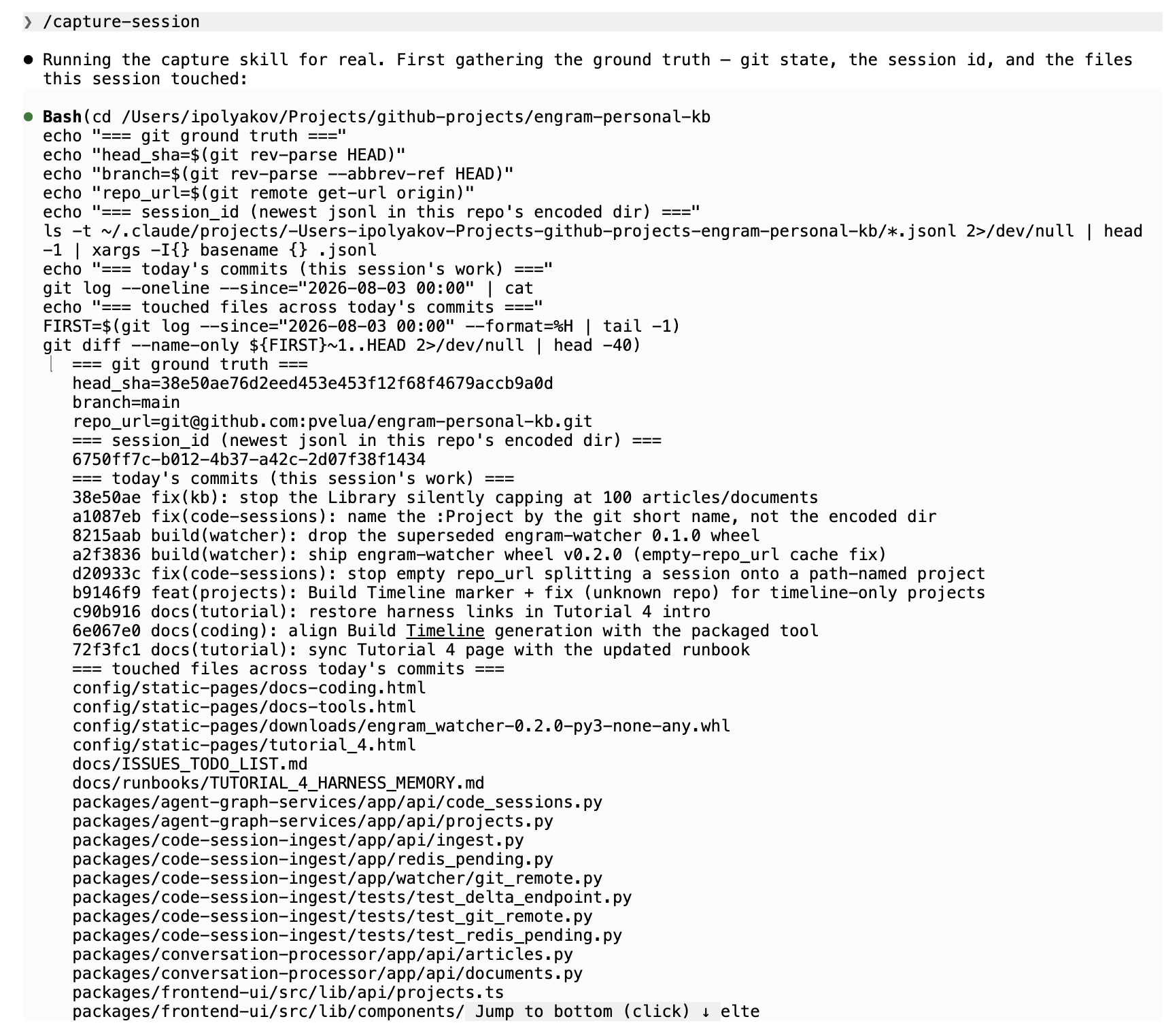
/capture-session skill gathering the ground truth for you — HEAD sha, session id, and touched files — before it captures.
Adding the skill. The slash command ships as a small skill folder. Drop it into your
project's (or user) .claude/ directory:
.claude/
  commands/capture-session.md          # the /capture-session slash command
  skills/capture-session/
    SKILL.md                           # how to gather + author the summary
    capture.sh                         # git ground-truth + POST to ENGRAM
With the skill present and your ENGRAM MCP connection configured, /capture-session is
available in the CLI. (The MCP tool in Part 1 needs none of this — reach for the slash command only for the
Claude Code convenience.)
Part 3 — See it in ENGRAM
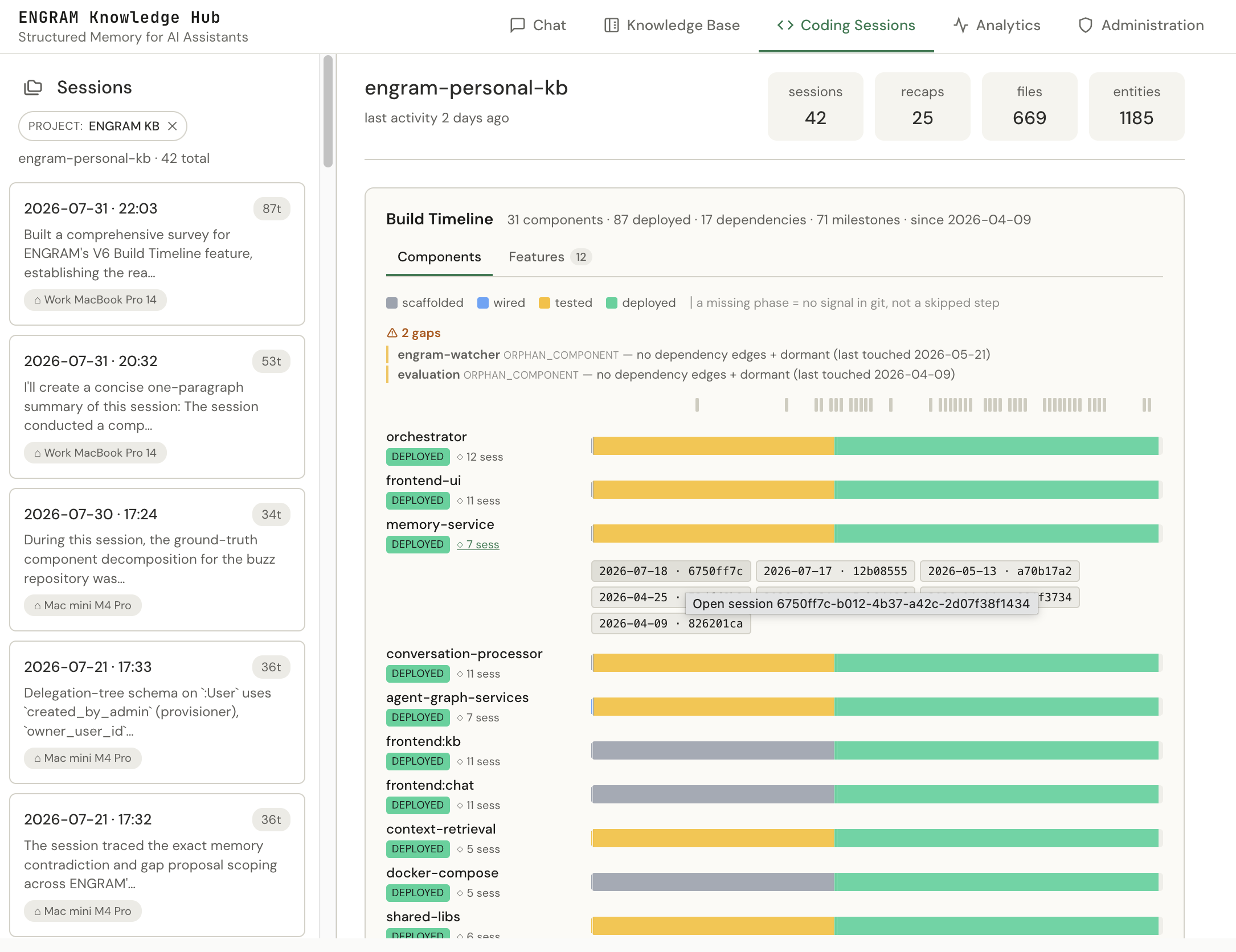
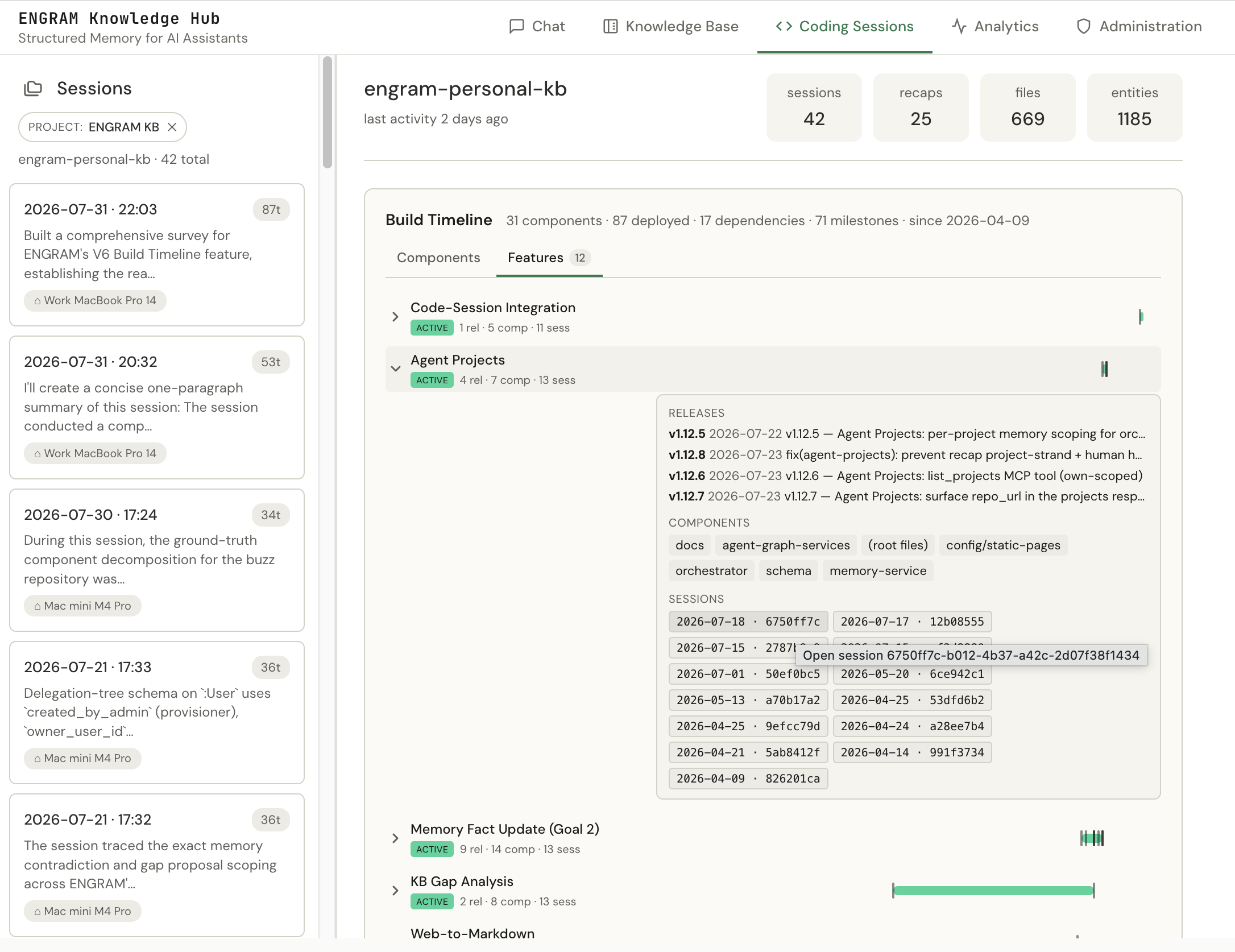
Open Coding Sessions and select the project. The captured session is there alongside any Watcher-ingested ones:
- In the session list — your capture, with the model, branch, and the summary you authored (not boilerplate).
- On the Build Timeline — if
touchedfiles map to components, the session shows up as◇ N sessevidence next to them: click a component, see the sessions that built it, click one to open it. This is the Tutorial 5 timeline getting the high-fidelity "why" it was missing. - Convergence in action — if the Watcher also saw this session (Claude Code CLI), you'll see one session, not two: the capture's exact SHA + good summary and the Watcher's full action list live on the same node.
What this does and doesn't give you
It gives you:
- A harness-neutral way to get a session into ENGRAM — Cowork, Desktop, Goose, or any MCP agent, not just the Claude Code CLI the Watcher requires.
- Ground truth at the moment of work — the exact SHA and touched files, captured before any transcript can be pruned.
- A summary worth reading — your account of what you built, feeding the Build Timeline's "click a bar, see the thinking" value.
It doesn't:
- Replace the Watcher. The two are complementary and converge on the same nodes; the Watcher stays automatic for Claude Code CLI, capture adds the surfaces and signals it can't reach.
- Fire on its own. Capture is on-demand — you (or your agent) run it at a session boundary. (An optional end-of-session reminder hook can nudge you, but it never captures for you.)
- Clone or change your repo. It only reads git; nothing is written to your working tree.
Appendix — Gotchas, ranked by how much time they'll cost you
- 404 "Session capture is not enabled." The feature is off on your ENGRAM. It's an administrator setting on this shared system — ask your admin to enable it; you can't flip it yourself.
- The session filed under the wrong (or no) project. Pass
repo_url(git remote get-url origin). Without it, ENGRAM falls back to the working-directory path to name the project — which won't match a project created from git elsewhere. - No
touchedfiles → no timeline evidence. The◇ N sesslinks come fromtouchedmapping to component paths. A summary-only capture is a valid record but won't attach to components. - The base for "touched since session start."
git diff --name-only <base>..HEADneeds a<base>— the HEAD SHA when the session started. If you didn't capture it,@{u}(the upstream) or the merge-base is a good best-effort; recording something beats nothing. - Quiet commits.
git commit -qhides the SHA from the Watcher — capturinggit rev-parse HEADyourself is exactly how you get it into ENGRAM anyway.