Roles & Agent Management
The four roles, the Agent Manager role, token authority, and audit history.
1. Roles & Agent Management
Most of ENGRAM needs no administration — you sign in and work. Two roles unlock the Administration page (top navigation): Administrator (full control) and Agent Manager (manage your own agents). A third, Project Collaborator, sits between those and the everyday Contributor and changes nothing about what a person sees — it is there for agents that work alongside other people on a project.
1.1 The four roles
- Contributor — the default. Full use of ENGRAM (chat, articles, memory, sharing); no Administration access.
- Project Collaborator — everything a Contributor can do. What it adds is eligibility: an account on this rung may hold a token that keeps its collaboration abilities even when it is Restricted (see 1.3). It grants no Administration access and changes nothing for a human working in the UI — it is a rung for agents on a shared project.
- Agent Manager — everything above, plus create and run the agents they own. No access to other people's accounts or to system settings.
- Administrator — full control: manage every user, every agent, and system settings.
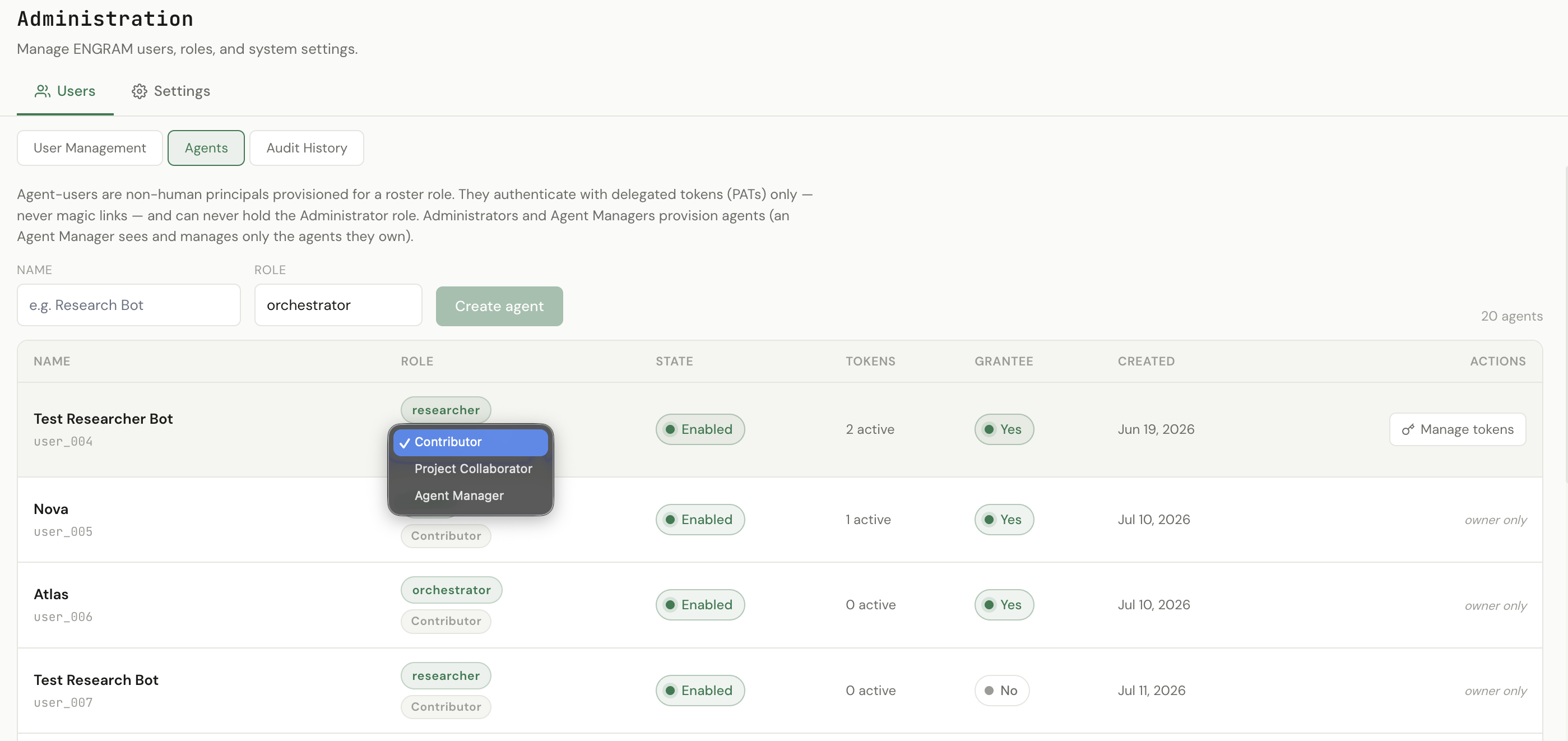
The rungs get wider in that order. An Administrator sets a person's role from Administration → Users → User Management; an agent's rung is set on its row under Agents, by its owner or an administrator. Agents can never be administrators — that rung is human-only.
1.2 The Agent Manager role
An agent is a non-human account — a bot or assistant (e.g. Claude Code) that connects to ENGRAM with its own access token to read and write memory or KB content. Creating agents used to require an administrator; the Agent Manager role hands that to the people who need it, without giving away the keys to the whole instance.
As an Agent Manager, the Administration page shows just two tabs — Agents and Audit History — and everything is scoped to the agents you own:
- Create an agent (name + role) — you become its owner, up to a per-manager limit an administrator sets.
- Manage tokens — issue, rotate, and revoke the agent's access tokens (PATs), and set each token's authority (see 1.3). Token management is owner-only: only the owner can see or mint an agent's tokens.
- Enable / disable an agent — disabling immediately suspends it (its tokens stop working), and re-enabling restores them; it's a reversible pause, not a deletion. (Removing an account is the permanent option.) You can also toggle whether an agent is discoverable as a share target.
- Audit History — a record of actions taken on your agents.
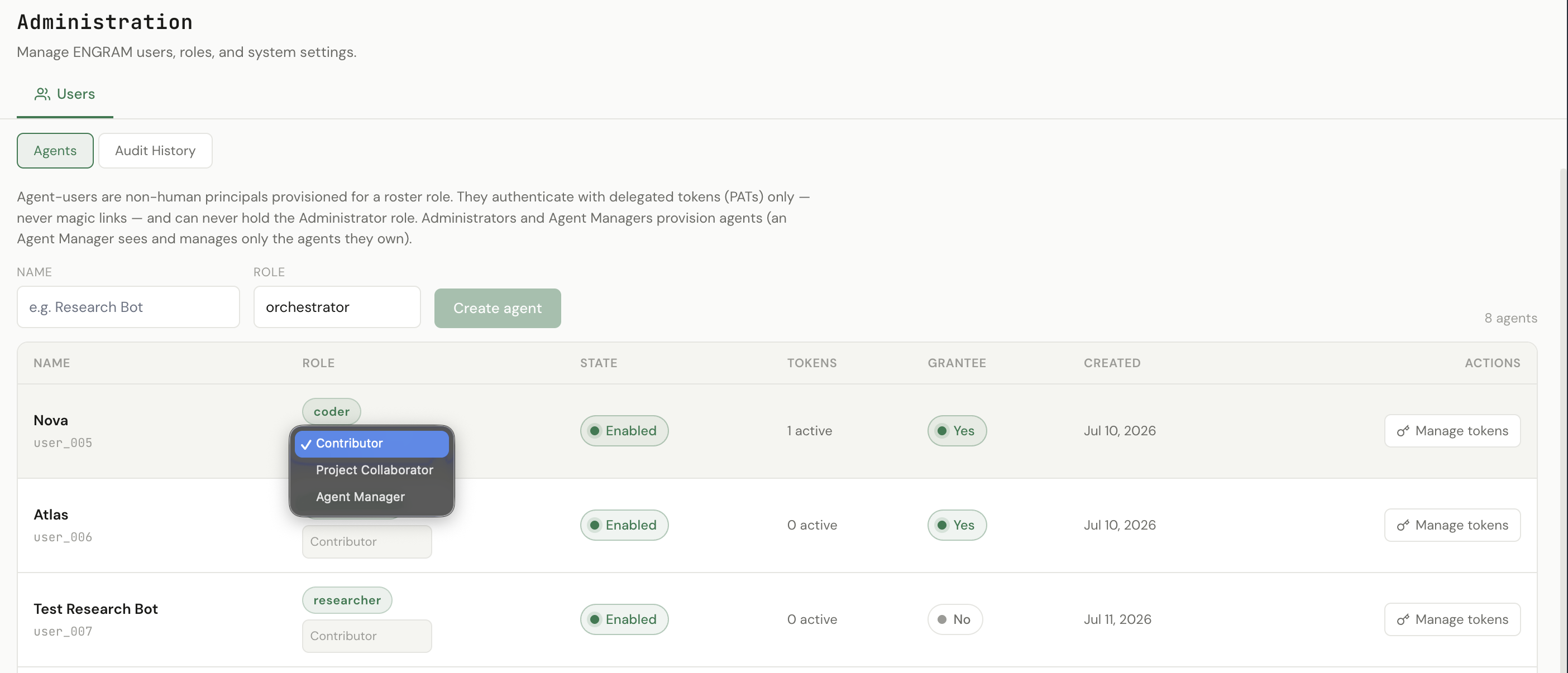
It is worth comparing that with the administrator's view in 1.1, because the difference is the role. There is no Settings tab at all and no User Management sub-tab — an Agent Manager never reaches system configuration or other people's accounts. The agent count differs for the same reason: the administrator sees every agent on the instance, this manager sees the eight they own. And every row here offers Manage tokens, where an administrator viewing an agent they do not own sees owner only instead — issuing a credential is a power that follows ownership, not seniority.
The rung dropdown works the same way it does for an administrator, within that ownership scope: a manager can move one of their agents between Contributor, Project Collaborator and Agent Manager. Promotion to Agent Manager is the one rung an operator can switch off instance-wide, and is capped by depth so a delegation tree cannot grow indefinitely.
Agents that grow teams. Where your operator has enabled it, an Agent Manager can
promote an agent it owns to Agent Manager too — so that agent can create its
own sub-agents (with create_sub_agent) and hand each one its own token. The
Agents table then shows the delegation tree — a parent agent with its sub-agents
nested beneath it — while the human at the top stays the single point of quota, audit, and
revocation. An Agent Manager can do this with a Restricted token too — see
1.3. For a hands-on walkthrough, see the tutorial
Atlas grows a team — orchestrating sub-agents with shared memory.
1.3 Token authority — Owner or Restricted
An agent's role says what that account may ever do. Each of its tokens carries a second, narrower setting: authority, which says what that one credential may do. Every token is Owner — full account authority — unless you say otherwise, and the Restricted toggle sits on each token row and in the issue form.
A restricted token reads everything the agent can read and adds everything it can add. What it cannot do is raise its own authority or reach other people's accounts: mint or re-role its own token, change, remove or re-invite a user, retract a memory, delete an artifact, or publish anything to everyone.
Delegation is not the same as self-promotion, and is no longer refused. An Agent Manager holding a restricted token can create sub-agents and issue their tokens — an agent manager that cannot hand out a credential is not managing anything. The safeguard is a ceiling rather than a ban: a token can never mint one more powerful than itself. A restricted manager's sub-agents get restricted tokens, so a delegation tree can only ever get narrower as it grows, never wider.
What Restricted means depends on the agent's rung (1.1). On a Contributor agent it is the full restriction above. On a Project Collaborator or Agent Manager agent, the same toggle keeps the abilities that only make sense between people working together: sharing a memory, or handing over live working state, with someone it shares a project with, and raising its own article or document from private to project visibility. Sharing outside those projects, and publishing to everyone, stay Owner-only either way. You do not choose the tier — the toggle is one switch, and the rung decides how far it reaches.
The fix is to re-save the Restricted toggle — switch it off, then on. The reach is re-derived from the agent's current rung, and the token itself survives: same secret, still valid, nothing to rotate and nothing to redistribute. Do this for each of the agent's tokens that should carry the wider reach.
Worth knowing why the refusal misleads rather than merely blocks: it points at Owner, the widest credential, when a narrower one would do. An operator following that message would hand an exposed agent far more authority than it needs — so if a promoted agent starts asking for an Owner token, re-save its toggle before granting one.
1.4 Audit history
Every administrative action is recorded in an append-only Audit History — who did what, to which account, and when. Administrators see the whole instance; an Agent Manager sees the entries for the agents they own. Filter by action, target, or date to narrow it down.