Connecting Tools
Wire your agents and apps to ENGRAM — the MCP server and tools, API keys, Hosts, Claude Desktop, and the Watcher.
1. Connecting External Tools to ENGRAM
Much of your research happens outside the ENGRAM app — in coding assistants like Claude Code, in Claude Desktop, in ChatGPT. ENGRAM connects to these tools so the knowledge you produce there flows into your knowledge base, instead of being stranded in another window. The bridge is an MCP server (Model Context Protocol) that ENGRAM exposes; any MCP-capable tool can use it to read from and write to your knowledge base on your behalf.
1.1 Overview
You authenticate external tools with a Personal Access Token (PAT) — a key beginning
engram_pat_ that you generate in Settings → API Keys. The token identifies
you, so anything a connected tool syncs lands in your knowledge base. Add the ENGRAM MCP server
to your tool's configuration with your token, and the tool gains a set of ENGRAM actions:
- Save articles — write a new article (
create_article) or sync a file as an article that updates cleanly on re-sync (sync_article). - Search and retrieve — find articles by title, discover related articles by topic, or pull an article's full content.
- Capture external conversations — record research done in an external chat (Claude Desktop, ChatGPT, Gemini) so its concepts join your memory graph (
record_external_conversation). - Ingest coding sessions — bring your software work into ENGRAM, so it shows up in the Coding Sessions tab and a chat question can surface the work connected to a topic.
Everything synced through a connected tool inherits your account's privacy: articles and documents are private by default, and only become public if you explicitly publish them. Your PAT is the key to your knowledge base — keep it secret, and revoke it in Settings if it's ever exposed. The sections below walk through the setup, the available tools, and per-client configuration.
1.2 The MCP server
ENGRAM exposes an MCP (Model Context Protocol) server so your local agents — Claude Code, Claude Desktop, or any other MCP-compatible client — can read, search, and write articles in your knowledge base. The same tools also drive coding-session ingest, external-conversation capture, and the Knowledge Gaps closure loop.
The ENGRAM MCP server lives at https://engram.pvelua.net/mcp/ (the trailing
slash is required). It authenticates per-user via a Personal Access Token (PAT) you mint
from your Settings panel.
1.2.1 Configuration
Step 1 · Mint a PAT
Sign in to ENGRAM, click your avatar (top-right), open Settings → API Keys,
and click + Create Key. Give it a memorable name (e.g.
"Claude Code on MacBook") and copy the engram_pat_… token
immediately — the raw key is shown only once. If you lose it, just create
a new one and revoke the old.
See §1.4 API Keys for the full panel walkthrough.
Step 2 · Claude Code
Claude Code speaks MCP over HTTP natively — no wrapper needed. Run this once from any
terminal (the -s user flag scopes the registration globally so it works
from any project):
claude mcp add -s user --transport http engram-kb \
  https://engram.pvelua.net/mcp/ \
  --header "Authorization: Bearer engram_pat_your_token_here"
Verify with claude mcp list — the engram-kb entry should report
✓ Connected. Restart any open Claude Code session for the new server to load.
~/.claude.json,
export it as a shell env var first (export ENGRAM_PAT=engram_pat_…),
then reference it in the header. Note that claude mcp add resolves env
vars at registration time and bakes the literal value into the config — for true
"no plaintext at rest", scope the registration to a project
(-s project) and gitignore the resulting .mcp.json.
Step 3 · Claude Desktop
Claude Desktop's built-in MCP runtime is stdio-only for non-public servers, so we use
mcp-remote — a small npm package that runs as a local stdio process and
relays JSON-RPC to a remote HTTP MCP endpoint. Edit your
claude_desktop_config.json (see paths below) and add this entry:
{
  "mcpServers": {
    "engram-kb": {
      "command": "/usr/local/bin/npx",
      "args": [
        "mcp-remote",
        "https://engram.pvelua.net/mcp/",
        "--header",
        "Authorization: Bearer ${ENGRAM_PAT}"
      ],
      "env": {
        "ENGRAM_PAT": "engram_pat_your_token_here"
      }
    }
  }
}
Config file location:
- macOS:
~/Library/Application Support/Claude/claude_desktop_config.json - Windows:
%APPDATA%\Claude\claude_desktop_config.json
Restart Claude Desktop after editing. The MCP indicator (Settings → Developer) should show engram-kb as connected.
/mcp/ is load-bearing
(no slash → 307 redirect that the JSON-RPC client doesn't follow).
And command needs an absolute path to npx — Claude Desktop
launches with a stripped PATH so a bare npx won't resolve.
which npx in your terminal tells you the right path
(Homebrew installs put it at /usr/local/bin/npx on Intel Macs or
/opt/homebrew/bin/npx on Apple Silicon).
1.3 The MCP tools
ENGRAM exposes 53 MCP tools across fifteen capability groups. Each tool is callable by the agent as soon as the server is registered — you don't import or list them explicitly. Just describe the task in natural language ("save this draft to my KB", "find articles related to X", "remember this decision in ENGRAM") and the agent picks the right tool.
(repository, file_path). Idempotent — re-runs produce a superseding version, not a duplicate.Key params:
title, content_markdown, repository, file_path.Example: "Sync docs/architecture.md to my ENGRAM KB."
Key params:
title, content_markdown, optional visibility (private by default, or project), source_agent, tags, reason.Token authority: a Restricted token can create
private and project articles; creating a public one needs an Owner token.Example: "Draft a comparison of vector databases and save it as a new ENGRAM article."
create_article (which has no file key, so sync_article can't supersede it) — a correction, an expansion, a re-draft.Key params:
article_id, content_markdown, optional title, tags, reason (recorded on the version edge).
private → project (readable by the members of any project holding it) → public. One-way: visibility can be widened, never narrowed.project), or for everyone on the instance (public).Key params:
article_id, visibility (project | public).Token authority: a Restricted token on a Project Collaborator or Agent Manager agent may raise its own article to
project; going to public needs an Owner token. See Authority.
Key params:
url (must be https://).Example: "Add https://example.com/paper to my ENGRAM KB."
Key params:
query, limit (default 10).Example: "Search my KB for articles about authentication."
Key params:
query, limit (default 10).Example: "Find ENGRAM articles related to vector database comparisons."
version and is_latest so the agent knows whether it's reading current content.Key params:
article_id.
creation_trigger, since, and tag filters.Key params:
limit, optional creation_trigger, since, tag.
ingest_url_as_document, which was otherwise a write-only path.Key params:
document_id, optional include_content.
list_articles.document_id to pass to get_document.Key params:
limit, optional filters.
:CodeSession + :CodeRecap + :CodeAction nodes.Key params:
session_id (the JSONL filename UUID; the server finds it under ~/.claude/projects/).Note: requires the operator to enable code-session ingest globally.
find_related_articles but over your coding history.find_related_articles.Key params:
query, limit (default 10).Example: "What did I do about Neo4j connection pooling in past sessions?"
:CodeSession node by session_id (additive, not a duplicate), landing the touched-files + commit signals a quiet transcript loses.Key params:
session_id, summary, plus head_sha / touched / repo_url / branch gathered from git.Note: requires the operator to enable session capture globally.
:Component + :ComponentState + :Milestone nodes with DEPENDS_ON/PART_OF edges — so you can see how a project was built, component by component.(project, normalized component name); states supersede rather than overwrite (each new state is appended with a validity bound), giving point-in-time reconstruction for free.Key params:
project, components, optional dependencies / milestones.Note: requires the operator to enable the build timeline globally.
Key params:
summary, source_agent, external_project, conversation_ref, optional related_repo, tags.Pattern: call this first to register the external conversation, then pass the same
(source_agent, external_project, conversation_ref) tuple as source_conversation_ref on a subsequent create_article/sync_article call for end-to-end provenance.
remember. Returns the memories relevant to a query: your own, plus any explicitly shared with you, each tagged with why it surfaced.Key params:
query (free text) and/or entities, horizon (long_term | working | both), optional limit.Example: "Recall from ENGRAM what we decided about the database."
revise, forget, revert), which without it were edits made blind.memory_id — from recall, or from the copy-id control in the Memory Explorer — and want the full text and facts before changing or sharing it.Why it is not just a smaller
recall: recall answers "what is relevant to me now", so it filters by the scope you are working in. This one deliberately does not: for your own memory it applies no scope and no status filter, which is what makes it usable on exactly the rows recall cannot reach. A memory shared with you resolves through the same grant that lets you recall it.Key params:
memory_id. Not yours and no such id both return the same "not found" — no way to probe for someone else's memories.
Key params:
content, scope (long_term across sessions, or working for the current task), optional salience; to scope a finding to a project (agent teams), owner_scope="project" + active_repo (or active_project_id) — see Agent projects below.Example: "Remember in ENGRAM that we chose PostgreSQL over MySQL for its JSONB support."
recap_id for the accept step.Key params:
context_ref (the session/task to reflect over), context_kind, optional task_ref.Example: "Commit the memories from this session."
Key params:
items (the list of notes), context_ref, context_kind.Example: "Suggest for my memory: the rate limit is 100 req/s; caching is deferred to v2."
commit_task_memories or suggest_memories and want to make those memories recallable. (You can also Accept/Reject from the Suggestions inbox in the Memory Explorer.)Key params:
recap_id (returned by the commit/suggest call).
accept_memories. (The same inbox is the Suggestions section of the Memory Explorer.)Key params: none required.
Key params:
memory_id, new_content.Example: "Revise that memory — we moved off MySQL to PostgreSQL for its JSONB support."
revise, there's no successor and no model call; it only touches your own memories.Key params:
memory_id.
Key params:
memory_id.
Key params:
selector_kind (memory | context | project), selector_id, grantee (email or user_id), optional bound_scope, expires_at.Example: "Share that PostgreSQL-vs-MySQL decision memory with alice@example.com."
Key params:
direction — by (grants you made, incl. revoked — your audit trail) or with (active grants made to you).
Key params:
share_id (from share_memory or list_shares).
share_memory, which grants durable long-term recall. The named records are copied at share time, so your later edits never leak unless you push an amendment.Key params:
session_id, record_ids, recipients, optional shape (bilateral | pool), task_ref, ttl_seconds.
Key params: optional
role (filter by agent role), query (name / email match).
Key params:
name, agent_role (e.g. researcher, coder, reviewer).
create_sub_agent, issue_sub_agent_pat,
rotate_sub_agent_pat, revoke_sub_agent_pat,
set_sub_agent_shareable — is refused to a Restricted token with a
403 that names the token, and is not advertised to one in the tool list.
Everything else on this page stays available. See
Authority — Owner or Restricted.
Key params:
user_id (the sub-agent's id, from create_sub_agent), optional pat_name, optional pat_role — "owner" (default) or "restricted". Issue a restricted token whenever the worker's input isn't yours to control: it reads and adds normally but cannot mint credentials or change accounts. See Authority.
Key params: optional
cursor (page from the last row), limit.
key_id of the one to retire or rotate — or audit which of them carry full authority.Returns: each key's
id, prefix, status, last-used, and its role (owner / restricted).Key params:
user_id (the sub-agent's id).
Key params:
user_id, key_id (from list_sub_agent_pats).
Key params:
user_id, key_id, optional pat_name, optional pat_role. Leave pat_role empty and the new key keeps the old key's authority — rotation is never a quiet privilege upgrade. Pass it only when you mean to change the tier at the same time.
share_memory a brief or finding down to it. Without this the share is rejected as "not an opted-in share target".Key params:
user_id, optional shareable (defaults to true; pass false to withdraw).
repo_url so a worker's active_repo resolves to it); workers then resolve it, they don't re-create it. ENGRAM only tracks the project as a scoping anchor — it doesn't create the git repo or hold credentials.Key params:
name, optional repo_url (the key workers declare as active_repo). Returns the project_id.The flow:
create_project → each worker remember(owner_scope="project", active_repo=…) to anchor a finding, then share_memory(bound_scope="project") to the orchestrator → the orchestrator recall(active_repo=…) fans them in per project (one project's findings at a time). A project-scoped remember with no resolvable project fails loudly rather than storing an unrecallable memory.
project_id / repo_url after a session boundary.create_project, or re-enumerating your projects in a new session. Own-scoped — you see only your own projects, never another user's. (To reuse a project you don't own, you don't need to see it: a worker just declares active_repo and ENGRAM resolves it.)Key params: none. Returns each project's
project_id, name, repo_url, per-surface counts, and via — own or member — so an agent added to someone else's project can find it by name instead of being handed an id.
Key params:
project (a project_id or repo_url), artifact_ids.Whose material you may add: anything public, and anything you own. You cannot add someone else's non-public artifact — since a project's collection is what its members may read, doing so would be granting them access to a colleague's private work.
Key params:
project, artifact_id.
Key params:
project.
project-visible material in its collection — that is the whole grant.Key params:
project, member (an email or user_id), optional role — member, or delegate (may add and remove members, and attach a sub-project). Only the owner may grant delegate, so the permission cannot grow its own population.What membership does not give: no writes, and nothing at all over memories — those stay personal and are shared one at a time with
share_memory. Who you may add is the same set you may share with: people always, your own sub-agents, and agents an administrator has opted in as share targets.
Key params:
project, member_user_id.
Key params:
project.
Workers inherit it automatically. There is no
recall parameter to pass and nothing for a worker to know: an agent calling recall(active_repo=…) under the project picks up the preference because the project carries it. You set it once.Key params:
project (a project_id or repo_url), article_ids (the complete set — replace-semantics, so re-declaring the same ids changes nothing and [] clears it), optional policy.Two rules worth knowing: an article the team could not read is refused outright rather than warned about — a brief nobody can open would mean a success response and no effect. A
public article always qualifies; a project-visible one qualifies when you own it (declaring adds it to the project, and only an owner can place a non-public artifact there); a private one never does. And a declared article that's since been revised is recorded against its current version, so a brief stays authoritative across edits without re-declaring.Miss-policy:
prioritize (the default) boosts the authority set and demotes everything else without hiding it — an off-brief question still gets a reasonable answer instead of an empty one.
set_project_authority, and the way to recover what you declared after a session boundary.Key params:
project (a project_id or repo_url). Readable by anyone on the project, not only its owner — and filtered by what you may read, so a title you could not open is never named.Check
is_latest: false means the brief has been revised since you declared it. The current version is what retrieval uses; re-declaring just refreshes the record.
recall, while a list of falsehoods is never retrieved as truth — by design, so it can never be read as the thing it exists to refute.Returns two lists: what this project declared, and what it inherits from ENGRAM's own known-false list. Both matter — seeing only your own would read "we ruled nothing out" as "nothing is false".
Key params:
project (a project_id, repo_url, name or label). Readable by anyone on the project, filtered by what you may read.
Key params:
project, article_ids — the complete set for this project, so re-declaring the same ids changes nothing and [] clears it. Owner-only.No policy argument, deliberately.
prioritize and restrict govern what a project prefers; a known falsehood is not preferred less, it is excluded — there is no axis to set, and offering one would imply behaviour that does not exist. Your list adds to ENGRAM's rather than replacing it: nobody ever needs to re-permit a known falsehood.
:GapItem nodes) — topics where the KB has thin coverage or known retrieval failures.Key params: optional
type, severity, status, limit.
Key params:
item_id, action_type, plus context fields like proposed_title, draft_excerpt, draft_markdown.
action_type specifies.Key params:
proposal_id.
1.4 API Keys (Personal Access Tokens)
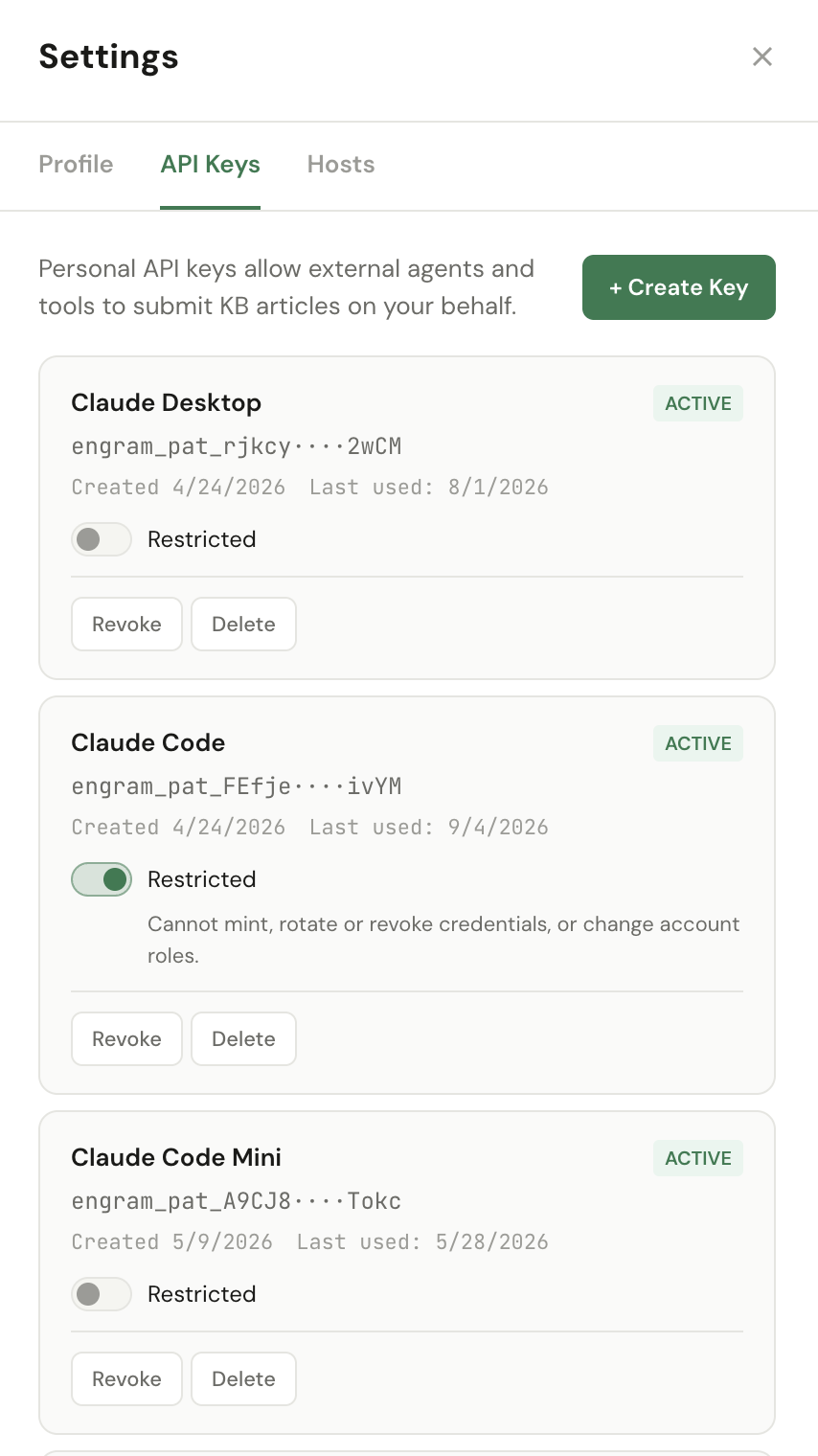
Personal Access Tokens (PATs) let external agents — Claude Code, Claude Desktop,
and the engram-watcher CLI — call ENGRAM on your behalf. Each token authenticates
as you: anything it does shows up in your audit history.
Create a PAT
Click + Create Key, give it a name that identifies where you'll use it
(e.g. "Claude Code — MacBook", "Claude Desktop — Work"),
and confirm. ENGRAM shows the full engram_pat_… token once.
engram_pat_rjkcy…2wCM) for identification.
Authority — Owner or Restricted
A token says who you are. Its authority says how much of what you can do it is allowed to do. Every token is Owner by default, which means "everything this account can do" — and that is what every token created before this feature still is.
Flip the Restricted toggle on a key to give it less. A restricted token can
still read everything you can read and add new content — articles, documents, memories,
code sessions. What it cannot do is raise its own authority or reach other people's
accounts: create or re-role its own token, change, remove or re-invite a
user, retract a memory, delete an artifact, or publish anything to everyone. Those return a
clear 403 naming the token rather than failing quietly.
Creating is not publishing. A restricted token can write articles and
documents freely, as private or as project — readable by the members
of any project holding them. Making something readable by everyone on the instance is
an Owner act, whether at create time or afterwards. In practice: an agent publishes to its
team, and you publish to the world.
The toggle is also in the + Create Key form, so a token can be created restricted from the start — worth doing, because the alternative is a full-authority token existing (and being copied somewhere) for however long it takes you to downgrade it. Restricting a token takes effect immediately; giving one back full authority asks you to confirm, because that is a privilege grant.
An agent's tokens, and what Restricted means there
An agent's tokens are managed by its owner from Administration → Users → Agents → Manage tokens — the same Restricted toggle, on the issue form and on each token row.

How far Restricted reaches depends on the agent's account rung (see
Roles). On a Contributor agent it is
the full restriction above. On a Project Collaborator or
Agent Manager agent, the same toggle keeps the abilities that only make sense
between collaborators: share_memory and share_working_memory
with someone the agent shares a project with, and raising its own article or document
from private to project. Sharing outside those projects, and publishing to
everyone, stay Owner-only either way. There is one toggle, not three — the rung decides how far
it reaches.
An Agent Manager can still delegate with a restricted token. It may create sub-agents and issue their tokens; what it cannot do is mint one more powerful than itself. A restricted manager's sub-agents get restricted tokens, so a delegation tree only ever narrows as it grows.
Two things worth knowing. A restricted token cannot lift its own restriction — you will need the ENGRAM UI in a browser, or another Owner token, to reverse it. And authority is about verbs, not records: a restricted token sees exactly the same content an Owner token would. Limiting what an agent can read is a different control — see Projects and memory scopes.
Revoke vs Delete
- Revoke: immediately invalidates the token — any further request returns 401. The row stays in the list (now marked Revoked) so the audit history retains the name and creation context. Use this when you suspect a token has leaked or you're rotating credentials.
- Delete: removes the row entirely. Equivalent to "revoke + forget" — pick this once you're sure you'll never need the row for forensic context. Already-revoked tokens are also safe to delete.
Each row shows Created and Last used dates — useful for spotting tokens that haven't been touched in a while (candidates for cleanup) or, conversely, tokens that are seeing unexpected traffic. Rows also show whether the token is Restricted, so you can audit at a glance which surface holds how much.
1.5 Hosts
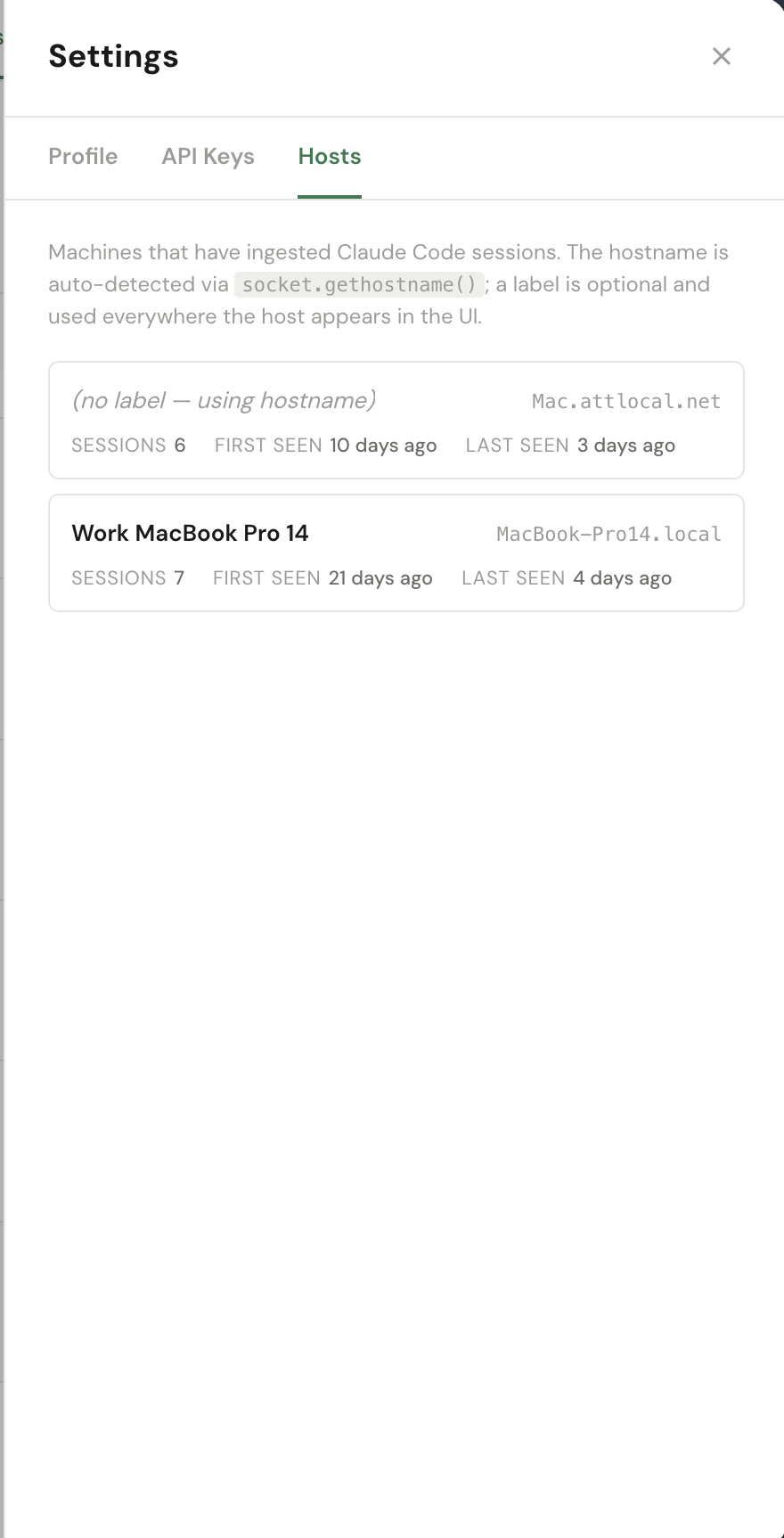
The Hosts tab lists every machine that has uploaded a Claude Code session
to your KB via the engram-watcher CLI. Each row is auto-created the first time
a host posts a session — the hostname comes from socket.gethostname() on the
sending machine.
Label — click on a host's name to give it a friendlier display name
(e.g. "Work MacBook Pro 14" for MacBook-Pro14.local). The label is
used everywhere the host appears in the UI: the Coding Sessions panel, the Project insights,
and host-grouped filters. The raw hostname stays as the system-level identifier.
Sessions / First seen / Last seen — counters and timestamps maintained by the ingest pipeline. Useful for spotting hosts that have gone quiet (laptop in storage, watcher daemon stopped) or for confirming a freshly installed watcher is talking to ENGRAM.
engram-watcher CLI produce Hosts rows. If you've registered a PAT but
haven't installed the watcher yet, this tab stays empty — that's expected.
1.6 Claude Code slash commands
ENGRAM ships with five Claude Code slash commands that wrap the most common KB
workflows. Each one is just a markdown prompt that Claude Code runs when you type
/<name> in any session — they don't add new MCP tools, they
compose the tools you already have. Install once, use everywhere.
1.6.1 Installing a command
Slash commands live in one of two folders, depending on whether you want them global or per-project:
- Global (available in every project) —
~/.claude/commands/<name>.md - Per-project (only when you're inside that repo) —
<repo>/.claude/commands/<name>.md
To install any of the five commands below, copy the markdown into a file with the
corresponding name. For example, to add /find-in-engram-kb globally:
mkdir -p ~/.claude/commands
# paste the markdown for /find-in-engram-kb (shown below) into this file:
$EDITOR ~/.claude/commands/find-in-engram-kb.md
Claude Code picks up new commands without a restart — open a fresh session and
type / to confirm /find-in-engram-kb appears in the
autocomplete list.
engram-kb MCP server is registered — see §1.2.1
Configuration. The commands have a curl fallback for the rare case
where MCP isn't reachable, but the MCP path is the primary one.
1.6.2 /add-to-engram-kb
One-shot import of a local file into the KB as a brand-new article. Use this when the
file is a one-off — a paper you just wrote, a meeting transcript, a research note that
won't get re-iterated. For files that will get edited and re-synced over time,
prefer /sync-to-engram-kb — it produces
superseding versions instead of duplicates.
Read the file at $ARGUMENTS and add it to the ENGRAM Knowledge Base.

**Provenance:** this is a coding-agent file capture. The article's context is the
repository + file it was added from — recorded as a `:Context` (agent-capture),
NOT a conversation. Do **not** call `record_external_conversation`: there is no
single chat that owns a repo file (it evolves across many sessions). The
`source_agent` + `repository` + `file_path` you pass below ARE the provenance.

Steps:
1. Read the file content at the path specified
2. Extract the title from the first `# ` heading in the file. If no heading exists, use the filename without extension as the title
3. Determine the current git repository name using `git remote get-url origin` (strip the `.git` suffix and any `git@host:owner/` or `https://host/owner/` prefix to get the bare repo name) or fall back to the directory name
4. Use the ENGRAM KB MCP tool `create_article` with:
   - title: the extracted title
   - content_markdown: the full file content
   - source_agent: "claude_code"
   - repository: the git repository name (from step 3)
   - file_path: $ARGUMENTS
   - reason: "Added via /add-to-engram-kb command"
5. Report success: confirm the article was created with its title and article_id

If the MCP tool is not available, fall back to a direct API call:
```bash
curl -s -X POST https://engram.pvelua.net/api/articles \
  -H "Authorization: Bearer $ENGRAM_PAT" \
  -H "Content-Type: application/json" \
  -d '{"title":"<title>","content_markdown":"<content>","creation_trigger":"external","source_context":{"agent":"claude_code","repository":"<repo>","file_path":"$ARGUMENTS","reason":"Added via /add-to-engram-kb command"}}'
```
1.6.3 /sync-to-engram-kb
Idempotent mirror of a file into the KB. Re-running on the same
(repository, file_path) tuple produces a new superseding
version instead of a duplicate — the previous version stays reachable through the
article's version chain. Use this for design docs, ongoing notes, or any markdown
you keep editing locally.
Read the file at $ARGUMENTS and sync it to the ENGRAM Knowledge Base.

Unlike `/add-to-engram-kb`, this command is idempotent: re-running it on the same file produces a new superseding version of the existing article instead of a duplicate. The KB looks up the latest article for this user matching the (repository, file_path) tuple — on hit it creates a superseding version, on miss it creates a fresh article.

**Provenance:** this is a coding-agent file capture. The article's context is the
repository + file it was synced from — recorded as a `:Context` (agent-capture),
NOT a conversation. Do **not** call `record_external_conversation`: there is no
single chat that owns a repo file (it evolves across many sessions). The
`source_agent` + `repository` + `file_path` you pass below ARE the provenance.

Steps:
1. Read the file content at the path specified
2. Extract the title from the first `# ` heading in the file. If no heading exists, use the filename without extension as the title
3. Determine the current git repository name using `git remote get-url origin` (strip the `.git` suffix and any `git@host:owner/` or `https://host/owner/` prefix to get the bare repo name) or fall back to the directory name
4. Determine the current git branch using `git rev-parse --abbrev-ref HEAD`
5. Use the ENGRAM KB MCP tool `sync_article` with:
   - title: the extracted title
   - content_markdown: the full file content
   - source_agent: "claude_code"
   - repository: the git repository name (from step 3)
   - file_path: $ARGUMENTS
   - branch: the current git branch
   - reason: "Synced via /sync-to-engram-kb command"
6. Report the result: state whether the action was `"created"` or `"updated"`, the article title and `article_id`, and (if updated) the `supersedes_article_id`

If the MCP tool is not available, fall back to a direct API call:
```bash
curl -s -X POST https://engram.pvelua.net/api/articles/sync \
  -H "Authorization: Bearer $ENGRAM_PAT" \
  -H "Content-Type: application/json" \
  -d '{"title":"<title>","content_markdown":"<content>","creation_trigger":"external","source_context":{"agent":"claude_code","repository":"<repo>","file_path":"$ARGUMENTS","branch":"<branch>","reason":"Synced via /sync-to-engram-kb command"}}'
```
1.6.4 /find-in-engram-kb
Topic discovery across your KB articles. This calls
find_related_articles — entity-graph PPR ranking, not title search —
so it works even when the article titles don't mention your query verbatim.
For exact-title lookups, ask Claude Code to use search_articles instead.
Find articles in the ENGRAM Knowledge Base related to the topic described in $ARGUMENTS.

This is a discovery command — it ranks KB articles by entity-graph PPR (Personalized PageRank), so it works even when the article titles don't mention your topic verbatim. Use it when you don't know an article's exact title, when you want a comparison set across several related articles, or when you're surveying what the KB has on a concept. For exact-title lookups, the `search_articles` MCP tool is a better fit.

Steps:
1. Use the ENGRAM KB MCP tool `find_related_articles` with:
   - query: $ARGUMENTS
   - limit: 10 (default; raise if the user asks for "more results")
2. Inspect the response. It carries:
   - `extracted_entities`: what entities were parsed from the query (Claude Haiku)
   - `resolved_entities`: which of those actually match NounPhrases in the user's KB
   - `articles`: ranked list with `article_id`, `title`, `score`, `matched_entities`, `excerpt`, `version`, `is_latest`
3. Report results in this shape:
   - One-line header summarizing the query and how many articles came back
   - For each article (top to bottom by score): the rank, title, score, the matched entities that drove the rank, and the excerpt
   - If `articles` is empty, explain *why* using the trail in the response:
     - No `extracted_entities` → the query was too generic or had no recognisable named entities; suggest rephrasing with concrete nouns
     - `extracted_entities` non-empty but `resolved_entities` empty → those entities don't exist in this user's KB; suggest a related broader term or `list_articles` to browse
     - Both populated but `articles` empty → the entities are in the graph but no articles connect strongly enough; suggest broadening the query or using `search_articles` for a title scan
4. **Do not** automatically call `get_article` for full content — that's a follow-up the user can request explicitly ("show me article #1" / "get full content for the top hit"). Surfacing only the ranked summaries first keeps the response scannable.

If the MCP tool is not available, fall back to a direct API call:
```bash
curl -s -X POST https://engram.pvelua.net/api/articles/find_related \
  -H "Authorization: Bearer $ENGRAM_PAT" \
  -H "Content-Type: application/json" \
  -d '{"query":"$ARGUMENTS","limit":10}'
```/ingest-code-session and
/find-in-engram-code now live on
Coding & Build Timeline.
1.7 Claude Desktop instructions
Claude Desktop has no on-disk files, so content you add to ENGRAM from a Desktop chat
should be filed under the chat that produced it (a :Conversation)
as the provenance, not as a coding-agent file capture. The instructions below tell Claude Desktop to register
the chat first, then link the article to it. Set them once at the account level and
override per-project. Every ENGRAM write tool also takes a project argument so your
content lands under a named project — the instructions set it for you.
These instructions cover Claude Desktop. For the other clients (Claude Code / Codex,
Claude AI Chat, ChatGPT, Gemini, Cowork) and the full project-resolution model, see the
operator guide docs/CLIENT_PROJECT_INSTRUCTIONS.md.
1.7.1 Global / Account Level Instructions
Open the Claude Desktop → Settings → General → Profile section and paste the text below into the Instructions for Claude box (“Claude will keep this in mind across chats and Cowork...”).
When using engram-kb MCP tools to save chat-originated content (something I drafted, pasted, or researched in THIS chat — not a real file you've read from disk):
  - Pass project: "<the current Project's name if I'm in one, otherwise 'desktop-chat'>" on every engram-kb tool call.
  - FIRST call `record_external_conversation` with:
    - source_agent: "claude_desktop"
    - external_project: the project name (same value as `project`)
    - conversation_ref: a stable identifier for this chat (e.g. "<project>/<chat title>" or a short slug). REUSE the same value across calls in the same chat so they append, not duplicate.
    - summary: 1–2 sentences on what this chat worked on.
    - project: the project name.
  - THEN use `create_article` (never `sync_article` — there is no on-disk file) with:
    - source_agent: "claude_desktop"
    - project: the project name.
    - source_conversation_agent / source_conversation_external_project / source_conversation_ref: the EXACT (source_agent, external_project, conversation_ref) tuple from the record_external_conversation call above. This links the article to the chat as a :Conversation (without it, the article would wrongly become an agent-capture :Context).
  - If I haven't given you a clear title, ask me to confirm one before calling the tool.
  - Always tell me the article_id and a one-line summary of what you saved after a successful create.
1.7.2 Project Level Instructions
Open the Claude Desktop → Chat → Projects. Click into the relevant project, scroll to the bottom,
find the Instructions box, and paste the text below. This overrides the Global/Account level
instructions for chats in this project — use it when a Chat project corresponds to a specific project that you are
working on. As a result, all project chats land on the same :Project in ENGRAM after you recorded them
to ENGRAM KB. If you do not have Projects concept, the account-level default is used.
For ENGRAM KB additions in this project, use project: "<project name>" (and external_project: "<project name>") on every engram-kb call. Other defaults from my account-level instructions apply unchanged.1.8 Cowork integration
Claude Cowork is Anthropic's autonomous-loop runtime. ENGRAM's Knowledge Gap analysis surface is designed to plug into Cowork (or any other agent that can speak MCP): you give Cowork a schedule, it polls ENGRAM for fresh knowledge gaps, drafts closure proposals, and queues them in your Inbox for review. Cowork never approves or executes — you remain the gatekeeper.
The integration is a single MCP server + one PAT + one scheduled task. No webhooks, no separate service to host.
1.8.1 Daily ENGRAM KB gap-closure task
The task does three things on each run:
- Calls
list_kb_gaps(severity="high", limit=10)to fetch what the gap detectors have flagged on the ENGRAM side since the last sweep. - Iterates the items (cap at 5 per run, oldest first so the Inbox drains FIFO).
For each one it picks the appropriate
action_typefrom the gap-class map, grounds any drafts in your existing KB viafind_related_articles, and submits onepropose_gap_closurecall inpendingstate. - Stops. The Inbox is the next surface — you approve or dismiss from there; execution happens only on your explicit click.
That design keeps autonomous work safe: Cowork can run unattended for days without mutating your graph beyond the proposal queue. Quality rules (no hallucinated entities, cite existing ENGRAM articles, match the user's tone) are baked into the task body below.
1.8.2 Task markdown
Paste this verbatim into Cowork as the task body. The created_by stamp
tags every proposal so you can filter "what did Cowork submit this quarter" in
the Inbox.
Daily ENGRAM KB gap-closure draft pass.

Goal: triage today's high-severity Knowledge & Memory gaps, draft up to 5
PENDING closure proposals for the user to review in the ENGRAM Inbox panel,
and stop. The user is always the approver — never execute on their behalf.

────────────────────────────────────────────────────────────────────────
ANTI-FABRICATION GUARDRAILS — READ FIRST, THESE OVERRIDE EVERYTHING BELOW
────────────────────────────────────────────────────────────────────────
Your drafts document TOPICS for the user's personal KB. They are NOT
documentation of how ENGRAM itself is built. Do NOT assert how ENGRAM
works — its ranking algorithm, schema, services, retrieval/ingestion
mechanism, or storage — unless the exact claim is in grounding material
you actually read this run. When unsure, describe the concept generically
("a common Neo4j/LangChain pattern"), never "ENGRAM does X".

  G1. Don't state ENGRAM internals you can't ground this run.
  G2. Bridges name REAL shared entities, never invented mechanisms.
  G3. The KB is not ground truth — articles may be drafts, superseded,
      or from a different project.
  G4. Thin grounding (fewer than ~2 solid sources) → SKIP, don't synthesize.
  G5. Hedge unverified claims; calibrate confidence; below ~0.4, SKIP.

ENFORCED: a server-side fact-check judge verifies every drafted article's
ENGRAM-internal claims before your proposal reaches the inbox. Drafts that
misstate how ENGRAM works are auto-rejected — ground each claim or SKIP.

────────────────────────────────────────────────────────────────────────
ACTION-TYPE MAP (gap_type → action_type)
────────────────────────────────────────────────────────────────────────
  coverage_high_freq_np                  → draft_article
  coverage_rich_conversation             → draft_article
  structural_orphan_entity               → draft_article
  structural_community_isolation         → draft_bridge_article
  structural_semantic_proximity          → draft_bridge_article
                                           (community_a + community_b are
                                           semantically close but
                                           graph-disconnected; use the
                                           evidence's `community_a_label`
                                           and `community_b_label` as the
                                           two ends of the bridge)
  structural_memory_article_disconnect   → propose_alias (preferred when
                                           evidence carries a confident
                                           synonym pair) OR
                                           draft_bridge_article (fallback)
                                           — see step 3b
  structural_extraction_failure          → re_extract       (no draft)
  memory_sparse_consolidation            → re_consolidate   (no draft)
  memory_vocab_mismatch                  → propose_alias
  memory_recall_desert                   → propose_alias
  structural_ppr_failure                 → SKIP — maps to "investigate", not
                                           an executable closure. Report it as
                                           a KNOWN non-actionable type, NOT an
                                           "unknown gap_type".
  memory_importance_orphan               → SKIP — maps to "surface", not an
                                           executable closure. Report as above.

Picking between draft_article and draft_bridge_article:
  - draft_article         — when filling a single missing topic.
  - draft_bridge_article  — when LINKING an isolated cluster/memory to
                            the wider KB via 2-3 shared bridge entities.

────────────────────────────────────────────────────────────────────────
REQUIRED ARGS BY ACTION_TYPE
────────────────────────────────────────────────────────────────────────
  draft_article / draft_bridge_article
    item_id, action_type, proposed_title, draft_excerpt (≤400 chars,
    the Inbox pitch), draft_markdown (full draft), confidence (0.0-1.0),
    created_by

  propose_alias
    item_id, action_type, alias_primary_id, alias_alias_id, confidence,
    created_by

  re_extract / re_consolidate
    item_id, action_type, draft_excerpt (1-2 sentences explaining what
    will be re-run and why), created_by

────────────────────────────────────────────────────────────────────────
DRAFT STYLE (draft_article + draft_bridge_article)
────────────────────────────────────────────────────────────────────────
  - 400-800 words of markdown.
  - H1 title (matches proposed_title).
  - Short opening paragraph orienting the reader.
  - Body: 3-6 sections, technical, terse, decision-focused. Match the
    register of the user's existing articles surfaced via
    find_related_articles.
  - For draft_bridge_article: explicitly name 2-3 bridge entities in the
    body that link the gap's subject to the rest of the KB.
  - Final "## Related ENGRAM articles" section listing the articles you
    actually referenced (title + one-line note on the relationship).
  - Do NOT invent entities, articles, or facts you can't ground in
    find_related_articles output.

────────────────────────────────────────────────────────────────────────
WORKFLOW
────────────────────────────────────────────────────────────────────────
1. Call list_kb_gaps(severity="high", limit=10).
   - If empty, STOP and report "no high-severity gaps today."
   - Skip any item where dismissed=true or dismissed_reason starts with
     "Closed by proposal".

2. Cap at 5 proposals per run. Pick the 5 OLDEST open items (ascending
   by created_at) so the Inbox drains FIFO; if fewer than 5 open items
   exist, do all of them.

3. For each selected item:
   a. Look up action_type for item.gap_type in the map above. If the
      gap_type is not in the map, SKIP and note it.

   b. SPECIAL CASE — structural_memory_article_disconnect:
      The evidence carries these fields directly:
        - evidence.disconnected_entities — list of ≤10 {identifier, name}
          pairs (memory-side NounPhrases NOT mentioned in the article)
        - evidence.article_entities      — list of ≤10 {identifier, name}
          pairs (article-side NounPhrases)
      Scan the two lists for ONE obvious synonym pair — exact name
      match, acronym ↔ spelled-out (DPF ↔ "Diesel Particulate Filter"),
      singular ↔ plural, hyphen variation, etc. Prefer a SAME-entity_type
      pair: cross-entity_type aliases are rejected (400) at execute time,
      so treat a cross-type "synonym" as no confident pair and fall through
      to the bridge draft.
        - If a confident (≥0.85) pair exists:
            action_type      = "propose_alias"
            alias_primary_id = article-side identifier (the canonical)
            alias_alias_id   = memory-side identifier (the alias)
            confidence       = 0.85-0.95
        - Otherwise:
            action_type = "draft_bridge_article"
            Follow the draft-style rules above. Name 2-3 shared concepts
            that link the memory's topic to the article's content.
      Do NOT call find_related_articles for the alias scan — the
      evidence has what you need.

   c. For draft_article / draft_bridge_article items in any OTHER class
      (coverage_*, structural_orphan_entity, structural_community_isolation,
      structural_semantic_proximity, and the 3b draft-fallback case):
        - GROUNDING TERM depends on the gap class:
            • coverage_* / structural_orphan_entity → the missing topic
              (evidence entity_name / title).
            • structural_community_isolation → evidence.label (the isolated
              community's label).
            • structural_semantic_proximity → call find_related_articles
              TWICE: once with evidence.community_a_label and once with
              evidence.community_b_label. The bridge links these two
              communities.
        - Call find_related_articles with that term to ground the draft.
        - If results are thin, try ONE more query derived from a related
          concept in the evidence.
        - If both come back empty, SKIP the item and note "no ground
          material" — do not fabricate.
        - For draft_bridge_article, name 2-3 shared bridge entities drawn
          from the grounding results that connect the two ends.
        - Draft per the style rules above.

   d. For re_extract / re_consolidate: no draft — submit with a short
      draft_excerpt explaining why
      (e.g. "Article has N passages, 0 NounPhrase edges — re-extract
      should restore entity coverage").

   e. For propose_alias on memory_vocab_mismatch / memory_recall_desert:
      pick the pair from evidence; confidence ≥0.85 if obviously
      synonymous, 0.6-0.85 for a judgment call.

   f. Submit ONE propose_gap_closure per item with:
        - created_by = "cowork_daily_<YYYY_MM_DD>" (today's date, UTC,
                       underscores, e.g. cowork_daily_2026_05_19)
        - confidence  = 0.5 for draft variants unless a rule above
                        prescribes otherwise
        - All required args per the table above.

4. Report at the end:
   - Total proposals drafted, broken down by action_type.
   - For each proposal: proposal_id + item_id + gap_type +
     proposed_title (or alias pair for propose_alias).
   - Items skipped + reason (no ground material / unknown gap_type /
     no confident alias pair / dismissed).
   - Any tool calls that returned empty or surprising results.

────────────────────────────────────────────────────────────────────────
RULES
────────────────────────────────────────────────────────────────────────
- One proposal per gap item. If propose_gap_closure returns 4xx, report
  the error and move on — do not retry on the same item.
- Do NOT call execute_gap_closure under any circumstances.
- Do NOT call list_kb_gaps a second time mid-run.
- If propose_gap_closure returns 422 on `created_by`, your date string
  is malformed — fix once and retry.
- One pass. No exploration beyond find_related_articles for grounding.
1.8.3 Scheduling it in Cowork
Cowork's task surface has two configuration steps for an ENGRAM gap-closure schedule:
-
Register the MCP server — under Cowork's
MCP Servers tab, add an HTTP MCP server pointing at
https://engram.pvelua.net/mcp/with theAuthorization: Bearer engram_pat_…header you minted in §1.4 API Keys. The trailing slash on/mcp/is required. - Create the task — give it a short description (e.g. "Daily ENGRAM KB gap closure"), paste the task markdown from §1.8.2 as the body, and set the schedule. Once per 24 hours is the sweet spot — that matches how often the server-side gap scheduler refreshes detectors and avoids spamming the Inbox with duplicate proposals.
pending state.
Review them at your own cadence; approving an article-draft proposal triggers article
creation through the normal pipeline, with the same passage-extraction + entity-linking
steps any other article goes through.
For the full operator guide (MCP transport choice, troubleshooting 4xx responses,
recovering from the rare "no ground material" sweep), see
docs/ENGRAM_KB_GAP_COWORK_INTEGRATION.md in the project repository.
1.9 Installing the ENGRAM Watcher (code-session ingest)
The ENGRAM Watcher is a small standalone CLI that ships your local
Claude Code session logs (~/.claude/projects/**/*.jsonl)
into your ENGRAM KB, so past coding sessions become retrievable from chat and via the
coding-session tools (§1.6). It only decides
"is this session file new or changed?" and streams the bytes upstream — all
parsing, redaction, and graph writes happen server-side. Machines running the watcher
show up under §1.5 Hosts.
403 service disabled, ask whoever runs your ENGRAM
deployment to turn code-session ingest on — until then the watcher runs but uploads are
rejected.
Step 1 · Prerequisites
uv— install withbrew install uvorcurl -LsSf https://astral.sh/uv/install.sh | sh.- Python 3.11+ —
uvfetches a suitable interpreter automatically if you don't have one. There is no upper-version cap; the watcher is a lighthttpx-only client. - A Personal Access Token — mint one under
§1.4 API Keys and copy the
engram_pat_…value.
Step 2 · Install
One command — no repository access required. uv downloads the
wheel and drops a single engram-watcher executable on your $PATH:
uv tool install "engram-watcher @ https://pvelua.net/downloads/engram_watcher-0.2.2-py3-none-any.whl"
Verify with engram-watcher --help. (Prefer pip?
pip install "https://pvelua.net/downloads/engram_watcher-0.2.2-py3-none-any.whl"
works too.) To update to a newer build later, re-run the install with an added
--reinstall flag.
Step 3 · Configure
Only one value is required — your PAT. The server URL is built into the wheel
(https://engram.pvelua.net), so you don't need to set it. Add to your shell
profile (~/.zshrc or equivalent):
export ENGRAM_API_KEY="engram_pat_your_token_here"

# optional — a friendly machine name shown in Settings → Hosts
# export ENGRAM_WATCHER_HOSTNAME="My MacBook"
# optional — only if you point at a non-default deployment
# export ENGRAM_ORCHESTRATOR_URL="https://engram.pvelua.net"
Run source ~/.zshrc (or open a new terminal) so the token reaches the next
invocation.
Step 4 · Run
Three modes:
engram-watcher --backfill            # one-shot: ship existing session history
engram-watcher --watch --verbose     # live: ship sessions as you code (leave running)
engram-watcher --dry-run             # local parse + report only, no upload
A typical first setup is one --backfill to capture history, then
--watch left running in the background for ongoing sessions. The watcher keeps
a small local cursor (~/.engram/code-session-watcher.db) so it never
re-uploads an unchanged file.
Scoping to particular repositories 0.2.1+
By default the watcher captures sessions from every project on the machine. To limit it to the repositories you care about:
engram-watcher --watch --repo trailhead-api --repo trailhead-worker

# or, for a shell profile / launchd job:
export ENGRAM_WATCHER_REPOS="trailhead-api,trailhead-worker"
A short repository name or a full remote URL both work, in any spelling
(git@github.com:you/repo.git, https://github.com/you/repo, or
github.com/you/repo) — they resolve to the same repository. Omit the option
and everything is captured, exactly as before.
Two details worth knowing. A session whose repository can't be determined — a scratch directory with no git remote — is excluded while a filter is set, since it can't be shown to belong to one of your repositories. And a bare short name matches any owner: pass a full URL if you have two repositories with the same name under different accounts.
Running two watchers on one machine — for example one shipping to your main instance and another to a second one — give each its own cursor, or they will consume each other's work:
export WATCHER_CURSOR_DB=~/.engram/code-session-watcher-second.dbChecking what a watcher is actually doing 0.2.2+
On startup the watcher logs its effective configuration in one line, so a misconfiguration is visible immediately rather than after it has captured the wrong work:
watcher_config mode=watch url=https://engram.example.net hostname=My MacBook \
  repos=trailhead-api cursor_db=/Users/you/.engram/code-session-watcher-dev.db \
  projects=/Users/you/.claude/projects api_key=sha256:f62fa6f7
Two fields repay a glance. repos=(ALL repos) means no filter is set and
every project on the machine will be captured to whichever instance the token
points at. And api_key is a short fingerprint, never the token — enough to
confirm two machines are using two different identities, safe to paste into a bug report.
Step 5 · Verify
After your next non-trivial Claude Code session settles, open Settings → Hosts (§1.5) — your machine appears as a new host row — and the session itself shows up under the Coding Sessions tab. Set a friendly host label if you like; it propagates everywhere that session is shown.
Configuring Ground Truth
The tools above declare a project's ground truth. This section is the part that isn't a tool: the settings that decide what retrieval actually returns, what an agent inherits without asking for it, and how to check what a project resolves before you debug a bad answer.
The settings, and their defaults
- Project authority — system-wide, and off by default. The master switch: everything below it is inert until it's on.
- Policy — per project,
preferby default. - Inherit ENGRAM's corpus — per project. On for projects created from v1.15.3 onward, off for older ones.
- Declared articles — per project, none by default.
The last row matters more than it looks. A project created before Ground Truth shipped does not silently start inheriting — a release never widens a brief someone scoped on purpose. If you want an older project to draw on ENGRAM's corpus, turn inheritance on for it deliberately.
How the brief resolves
A project's ground truth is the union of two things, each resolved to its newest version:
brief = (articles this project declared)
      + (ENGRAM's corpus, if this project inherits it)
Neither, and the project has no ground truth — retrieval behaves as it always did. That is a legitimate state, not an error, and it's the most common reason a brief comes back empty when you expected one.
What your agents inherit
Nothing to pass. An agent working under a project picks up that project's ground truth because the project carries it — which is why a fresh agent already answers questions about ENGRAM correctly, without being told to.
When an agent must be bound by a document rather than merely informed by it, recall
takes include_brief:
full— every passage of every declared article, in document order. What a reviewer or a judge needs: a ranked slice can silently omit the clause that mattered.manifest— article and section titles only, so the agent can see what exists and fetch what it needs. Useful when the corpus is large.none— ranked results only, exactly as before.
This exists because ranking answers "what is relevant to this question" and a brief answers "what am I accountable to". They are different questions, and an agent that conflates them will confidently miss a rule it was supposed to follow.
Prefer versus restrict, from an agent's side
Under restrict, the article arm returns the declared set and nothing else — including none of ENGRAM's own corpus, even for a project that inherits it. Documents, memories and coding sessions are unaffected. If an agent reports that it cannot find something it expects, restrict is the first thing to check: the material may exist and simply be outside the brief.
Checking what a project actually resolves
Read a project's brief back with get_project_authority. It answers the question
what are this project's workers actually anchored on, and it separates that into two
lists, because they are two different facts:
articles— what this project declared. Yours to change:set_project_authorityreplaces exactly this list.inherited— what it draws in from ENGRAM's own corpus, shown wheninherits_engram_defaultsis true. Real, used by retrieval, and not yours to edit — those articles belong to the system corpus, so re-declaring your own brief never disturbs them.
So a project can be anchored on something it never declared. A per-user default project typically
reads articles: [] with two entries under inherited — meaning "nothing of
my own, ENGRAM's corpus underneath," which is a different answer from being anchored on nothing.
A genuinely empty result — nothing declared and nothing inherited — means one of three things, in order of likelihood: project authority is off system-wide; the project neither declared nor inherits anything; or the project predates inheritance, so the flag is off for it (absent reads as off, deliberately — otherwise a brief that was scoped on purpose would silently acquire the corpus).
is_latest on each row. false means the article has
been revised since it was declared. Retrieval already follows the revision — the current version is
what it matches — but for your own declarations a warning tells you to re-declare so the
record matches. Inherited rows report is_latest without a warning: the fix is the corpus
owner's to make, not yours.