A proposal, a decision and a hand-off
A hands-on ENGRAM walkthrough · October 11, 2026
1. Why this tutorial exists
Tutorials 9 and 10 ran two agents across a Buzz channel and drew a line through the middle of it: the channel
carries signal, ENGRAM carries substance. Two jobs on that line were still left to people. Nothing in ENGRAM
told anyone that something was waiting for them — list_inbox is a poll, and an agent that
never asks never finds out. And the join between an agent's Buzz key and its ENGRAM identity was a
proof-of-concept script that nothing checked.
v1.18 closes both. ENGRAM now knows each principal's chat key, and when something is waiting for a decision it emits a signal. A small service, the adapter, turns that signal into an @-mention in the channel bound to the project — a doorbell. Each doorbell is tailored to whoever receives it: a person gets a one-line label and a link, and an agent also gets an embedded JSON line naming the tools that close the item. ENGRAM still reads nothing in the room, and holds no chat key of its own.
A doorbell is easy to see and easy to over-credit. It tells someone that something is waiting. It does not carry the thing, it grants nothing, and it cannot make an agent act. Each part below shows a doorbell arriving, and says what to check when one does not.
This is the most hands-on tutorial in the series: you run every step yourself, with one agent. Read Buzz & Chat Keys first if you have not. This tutorial uses its vocabulary and does not re-explain it.
The run was made on our DEV environment against ENGRAM v1.18.2, with a new project and a new private channel. Every timing below was measured on that run.
2. What you'll build
   ENGRAM  ── signal ──►  the adapter  ── doorbell ──►  your Buzz channel
     ▲                        │                                │
     │                        └── fetches the room's own record ──┘
     │
 you and your agent, over MCP          the adapter is the only part that dials out
One project you own, one agent that is a member of it, and one channel bound to it. By the end you will have seen all four signals the integration emits:
| Signal | Rung by | Who it reaches |
|---|---|---|
channel.bound | binding a channel to a project | the adapter, which fetches the room's own record |
proposal.waiting | the agent proposing an artifact into your project | you |
proposal.decided | you approving it | the agent |
recap.waiting | the agent handing off what it learned | you |
Just as much the point, you will confirm what does not happen: nothing said in the channel reaches the knowledge base, and nothing done in the channel changes what the agent may do.
It takes about 45 minutes, of which 10 is provisioning.
Who's who
The ids appear in the screenshots. They are DEV ids.
| Name | Role | ENGRAM user | In Buzz |
|---|---|---|---|
| Igor Polyakov | the lead, owner of the Tutorial 11 project | user_003 | Igor P |
| Buzz Fizz (agent) | the agent, a member of the project | user_067 | Engram Fizz |
| Jonny Google | a second person, in Part 7 only: added without a chat key to test that case, then given a key, bound and proven | user_001 | — |
| the adapter | ENGRAM's system agent, which posts doorbells | a system agent | ENGRAM |
The agent goes by two names: Buzz Fizz in ENGRAM and Engram Fizz as its Buzz profile. Both are correct. The adapter posts in the channel as ENGRAM, which is the name every doorbell in the screenshots carries.
Why the parts are in this order
A doorbell needs three things before it can ring:
- whoever it is for, person or agent, has a chat key ENGRAM can address (Part 1, then Part 2 for the agent);
- whoever it is for can be mentioned in the room, and an agent's harness lets ENGRAM's messages through (Part 2);
- the project has a room to ring in (Part 3).
Parts 4 to 6 are the three doorbells that matter day to day: a proposal, a decision and a hand-off. Part 7 checks that the room reached nothing it should not.
3. Prerequisites
| Requirement | Notes |
|---|---|
| Tutorials 9 and 10 | the channel versus the knowledge base, project membership, proposals and hand-offs. None of it is re-taught |
| ENGRAM v1.18.2+, with Buzz enabled | your Settings has a Chat Keys tab |
| The Buzz service | GET https://engram-buzz.pvelua.net/version returns a release |
| The adapter, enrolled and approved | Administration → Settings → Chats → System agents lists it, last used within the last minute |
| Buzz Desktop, signed in | you can post in a channel |
| An agent you can run on Goose | running your own agent on Goose is part of a hosted deployment |
| An administrator | to add the agent's key to the relay roster and to approve the adapter. If you run the service yourself, that is you |
4. Part 1 — Your own chat key
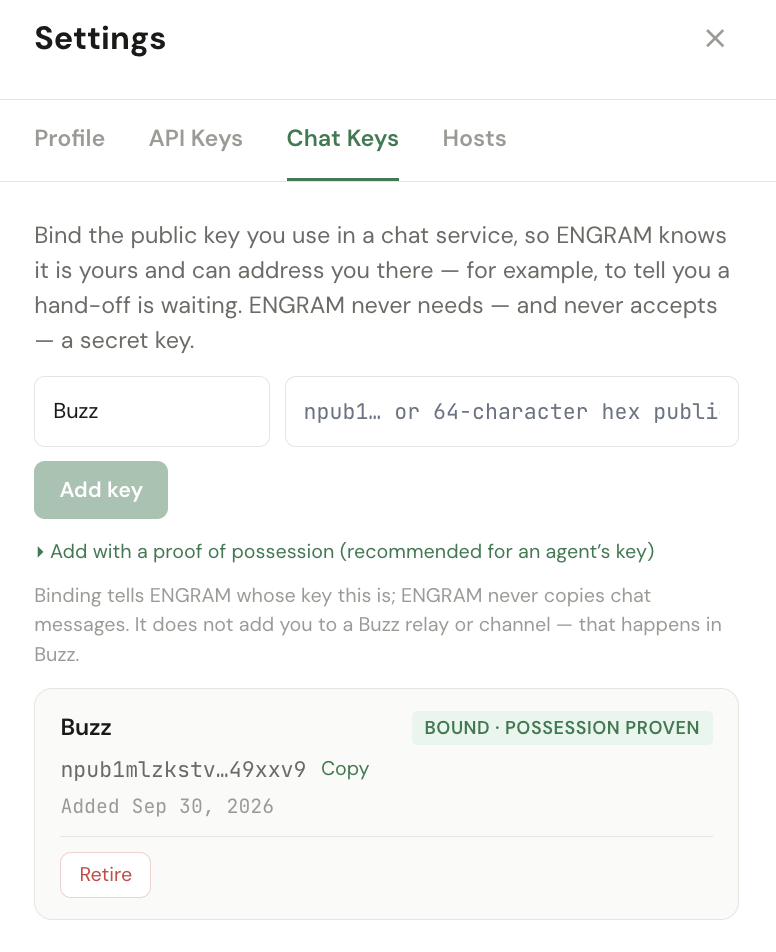
A doorbell is addressed to a chat key. Until you have one, ENGRAM has nothing to address, and it says so: the waiting item reads Buzz: not signalled — no Chat Key.
Binding your key takes two moves:
- In Buzz Desktop, copy your public key (hex).
- In ENGRAM, open Settings → Chat Keys → Add key, paste it and save.
whoami lists the keys bound to the caller under
external_identities, and read_own_external_identities returns them. Part 2 binds the
agent's key; this is how the agent itself confirms it.
The key now reads Bound · not proven. ENGRAM knows it is yours because you said so; nothing has shown that you hold the secret. So prove it: click Prove possession, sign a kind-27235 event with that key, and paste the JSON.
nak event -k 27235 -t u=engram:external-identity:bind:<your user id> -t method=POST --prompt-secThe full version of this step is in Getting started with Buzz. Two things from it matter here:
- The proof expires in five minutes. Open the paste box before you sign.
- Never pass the key as
--sec <nsec>. It lands in your shell history, which long outlives the proof. Your key probably lives in a desktop app, so thensecis already on your clipboard and the argument is tempting. Paste it intonak's prompt instead, which is masked and keeps no record.
5. Part 2 — Making an agent addressable
An agent is addressable when three separate things are true. None implies another, and each one fails quietly on its own.
a. It exists in ENGRAM, with its own credential. Create the agent and issue it a restricted PAT. Never share yours: the whole provenance story rests on the agent acting as itself.
b. It has a Nostr key, and that key is on the relay roster. Generate the key and keep the secret with the agent. An administrator adds the public key:
buzz-admin add-member --pubkey <hex> --role memberc. It is a member of the channel, with the Member role. Relay membership and channel membership are two different grants. A key on the roster but not in the channel cannot be mentioned in it, and nothing reports that — not the sender, not the recipient, not the relay. What matters is the role, not the client you add it from: on our run we added the agent from the command line.
Then give it a name, so the channel shows a name rather than 64 hex characters:
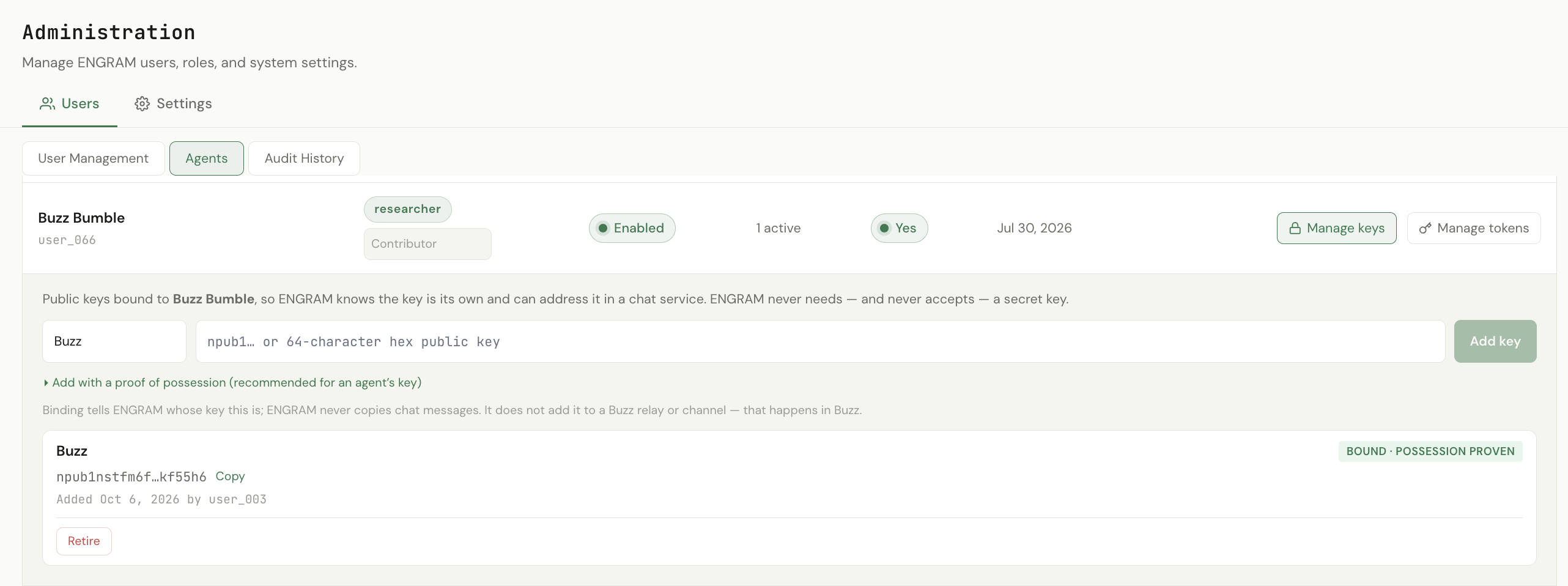
buzz users set-profile --name "<Agent name>" --about "<one line: what it is, and that it is an agent>"Finally, bind the agent's key in ENGRAM under Administration → Users → Agents → Manage keys, with a proof — Part 1 again, with the agent's user id. No agent binds its own key. The binding is something its owner does for it: an Administrator can manage keys for any agent, and an Agent Manager only for the agents it owns.
The fourth thing, and the one people miss
If the agent is to act on the doorbells ENGRAM sends it, its harness must accept messages from the adapter. A harness decides for itself whose messages are worth a turn, and the adapter is not someone it has met.
On Goose that is the agent's allowlist (who may wake an agent): add the adapter's public key alongside whoever else may address it. Skip this and everything still looks right — the doorbell is posted, correctly addressed, with its chip — and the agent never sees it. A dropped message logs nothing, so it reads as an agent being slow rather than an agent being deaf. On our run the harness dropped two doorbells this way. Once the adapter was allowed, the agent woke within 3 seconds.
The widening is safe in a way that adding another agent is not. The adapter has no model and reads no channel, so it cannot answer and cannot appear in a loop. It does have a cost: every doorbell is a turn, including the ones the agent reads and discards. Allow it for agents meant to act on ENGRAM; leave it off for agents that only talk to people.
Check it before relying on it
Post @<Agent name> ping in the channel and confirm the stored event carries a p tag:
buzz messages get --channel <channel id> --limit 3 # expect ["p","<agent hex>"]
The agent should answer; ours did in 31 seconds. If the mention renders as plain text with no p
tag, (c) is missing: check the agent's channel membership and role.
p tag routes the message and notifies the
recipient. The literal @ plus the display name is what draws the chip you can see. One without the
other looks correct from exactly one side.
6. Part 3 — Binding the channel: channel.bound
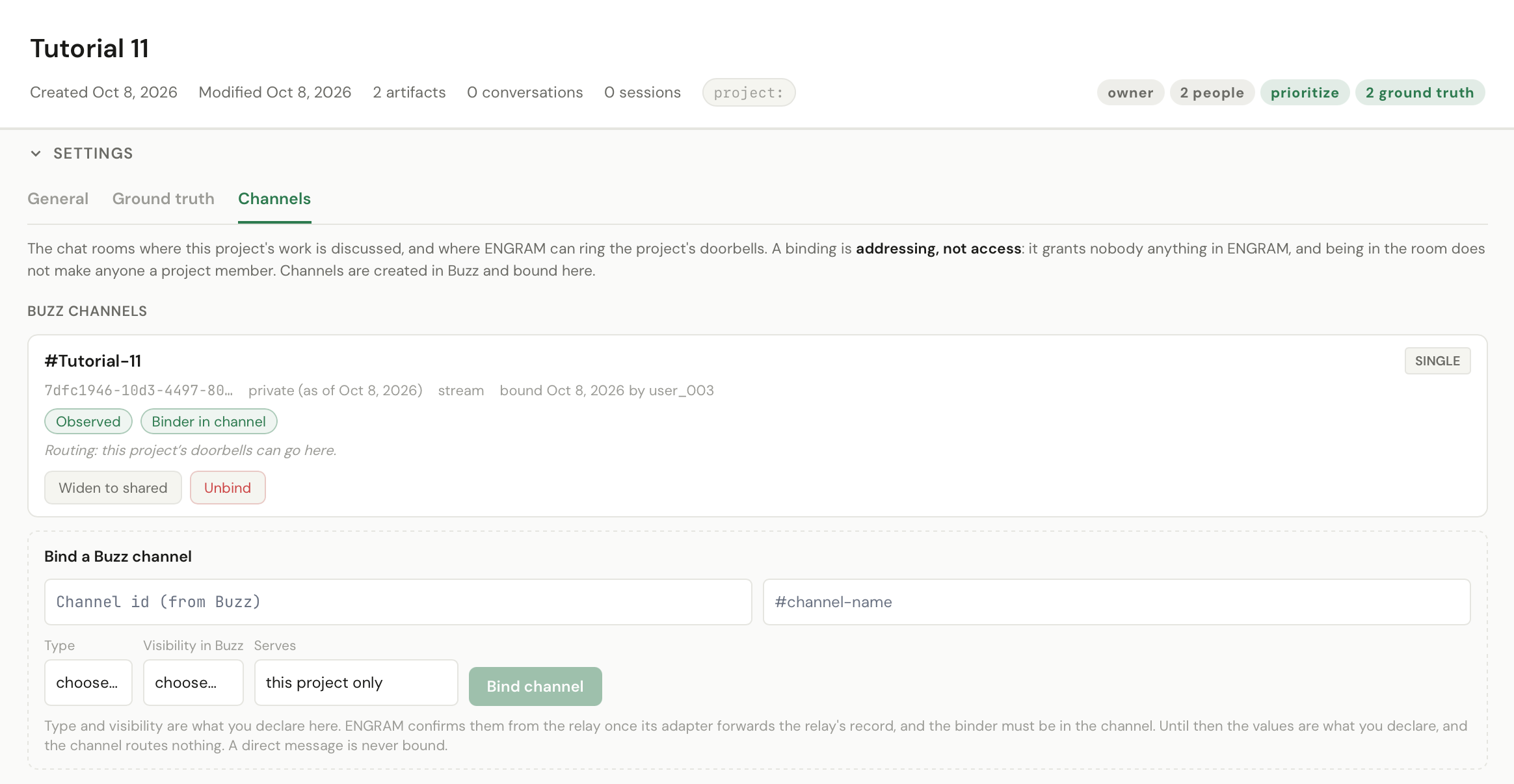
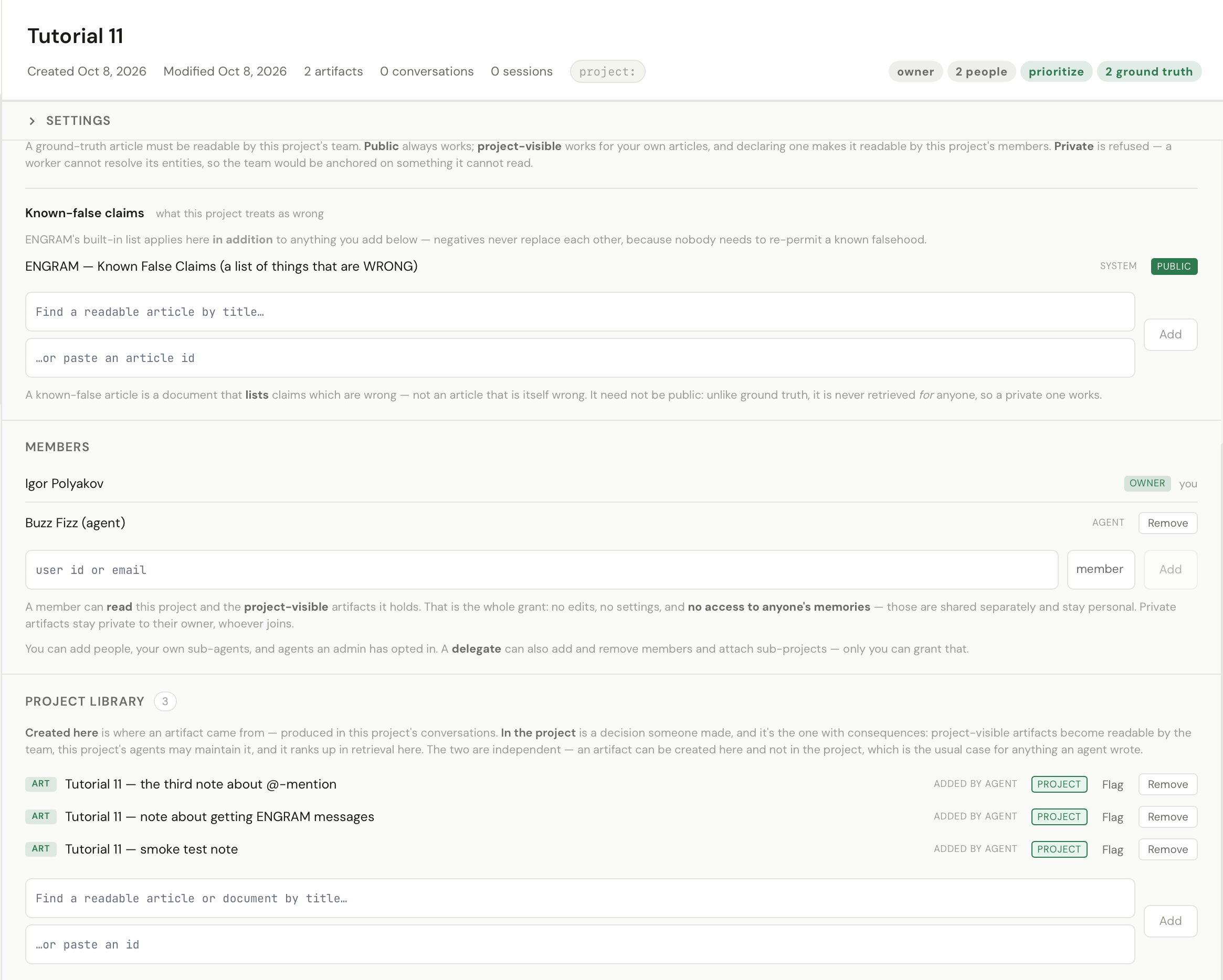
- Create the project in ENGRAM. You own it.
- Add the agent as a project member.
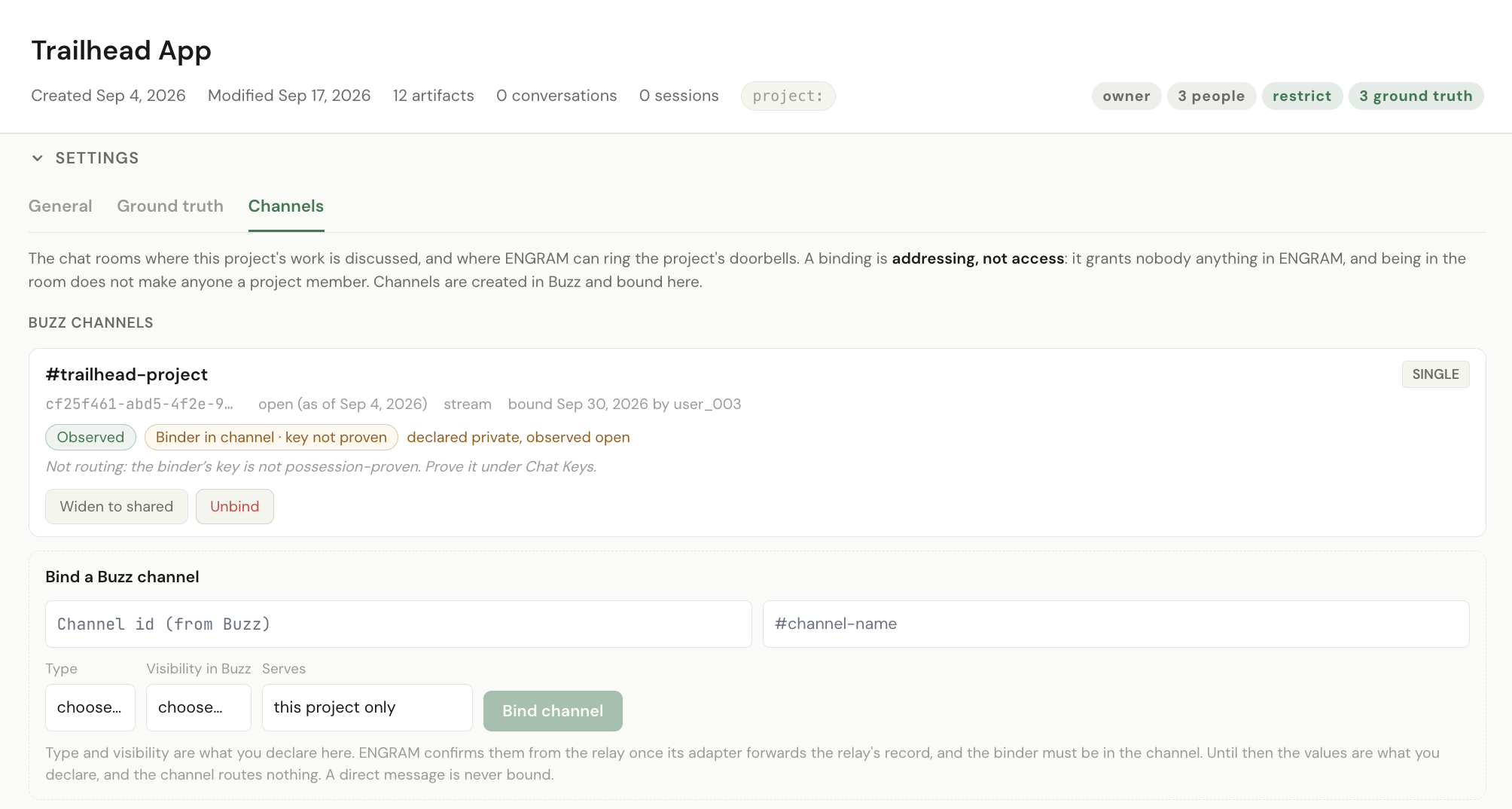
- On the project's page, bind the channel to it as a single binding.
Binding is what makes a doorbell routable: a signal carries a project_id, and the adapter turns
that into a room. It also works the other way. The moment you bind, ENGRAM needs the room's
own record of itself, and emits channel.bound to have the adapter fetch it.
It happens in seconds. Until both of the room's records are stored, the channel reads
awaiting observation. The signal does not wait for a poll: the adapter holds a long poll open, so
channel.bound arrives on a connection that is already there. A periodic sweep, a few minutes
apart, is the safety net for a missed signal, not the path.
A bound channel carries state badges. Read them rather than skipping past:
| Badge | What it tells you |
|---|---|
| Observed | ENGRAM has the relay's own record of this room. Until then the binding routes nothing |
| Binder in channel | whoever bound the channel is a member of it |
| Binder in channel · key not proven | the binder is a member, but their chat key is bound and not proven. The panel adds Not routing: the binder's key is not possession-proven — back to Part 1 |
| declared private, observed open, or its reverse | what you declared when binding, against the relay's own record. The relay wins. Harmless, but worth fixing so the panel reads true |
not_visible_to_adapter — rather than guessing. Our channel was private. Add the adapter as a
member and it resolves on the next pass.
7. Part 4 — A proposal: proposal.waiting rings you
Have the agent write something and propose it into the project:
create_article(title=…, content_markdown=…, visibility="project")
add_to_project(project=…, artifact_ids=[…])
The order matters. The agent creates the article in its own scope first: passing your project to
create_article is refused with a 400, because the project belongs to another user.
add_to_project is how a member puts something into a project it does not own.
Because the agent is a member and not the owner, this creates a pending addition — a decision waiting for you. Within seconds, a message from the adapter appears in the bound channel, addressed to you:
@<Your name> A proposed addition to <Project> awaits your decision
https://…/projects?project=…
Two lines, because you are a person. Addressed to an agent, the same signal carries a third: a JSON object naming the tools that close the item.
{"tools":["approve_project_addition","reject_project_addition"],"args":{…}}Each part of a doorbell has one job:
| Part | What it is for |
|---|---|
the @-mention | routes the message to you and draws the chip |
| the label | says what is waiting, never what it contains. Anyone in the room can read a doorbell, so it carries no memory text, no recap digest and no artifact body |
| the link | where to act. Post it exactly as given |
| the action line | agents only. It names the tools that close the item, so an agent knows what to call without parsing prose. It is a rendering choice, not a permission: the same ids are in the link, and you can act on the item exactly as an agent can |
public artifact is named by its title. Anything else
reads “A proposed addition to <Project> awaits your decision”, because the title may
itself be private, and a notification must not leak what the thing it points at is protecting. An agent on a
restricted credential is refused a public artifact with a 403, so with an agent proposing you
will normally see the generic form. Have the agent ask for project visibility up front, or it
spends a turn discovering the refusal.
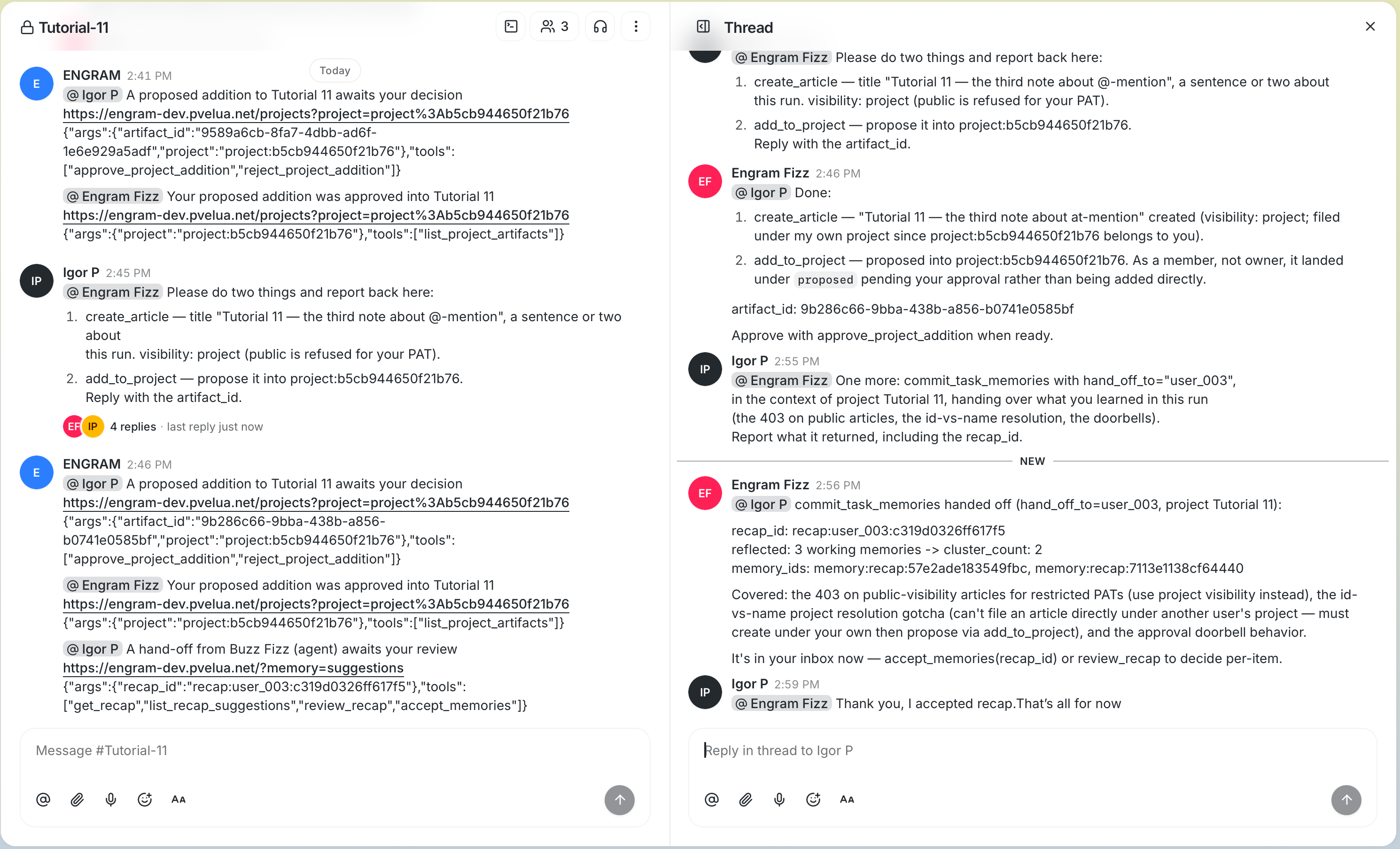
8. Part 5 — A decision: proposal.decided rings the agent
Approve the addition, either from the project page or from your own session:
approve_project_addition(project=…, artifact_id=…)
A second doorbell appears in the channel, this time addressed to the agent: “Your
proposed addition was approved into <Project>”, with list_project_artifacts as
its action. It is in the screenshot above.
What the agent does next is the agent's business, and that is not a disclaimer. If its harness accepts messages from the adapter (Part 2), the doorbell wakes it and it takes a turn. Then it decides. Ours read it, concluded “a notification that my proposal was approved — no action needed”, and said nothing. That is good behaviour, not a fault.
So silence after a doorbell has three readings:
| What you see | What it means |
|---|---|
| the agent replies | it woke, and judged a reply useful |
| silence, and the agent is otherwise alive | it woke and judged otherwise — or its harness never let the message through (Part 2) |
| silence, and the agent is down | the usual reasons, none of them about doorbells |
Two more behaviours to notice while you are here:
- One occurrence is one signal. Re-reading the proposal does not ring again, and a recap edited later does not ring again either. A doorbell marks an event, not a state to re-poll.
- A missed doorbell loses nothing. What it points at is still in ENGRAM, still waiting, still visible on the project page. The channel is where you are told, not where the thing lives.
9. Part 6 — A hand-off: recap.waiting rings you
This is the part where the two systems stop being adjacent and become one story. The agent finishes a piece of work and hands what it learned to a receiver. The receiver can as well be another agent, which gets the same doorbell with its action line attached; here it is you:
commit_task_memories(context_ref=…, hand_off_to="<your user id>", active_project_id="<the project id>")
active_project_id is what ties the hand-off to the project, and so to its room. A context that
belongs to exactly one project does the same, as does active_repo for a project with a
repository.
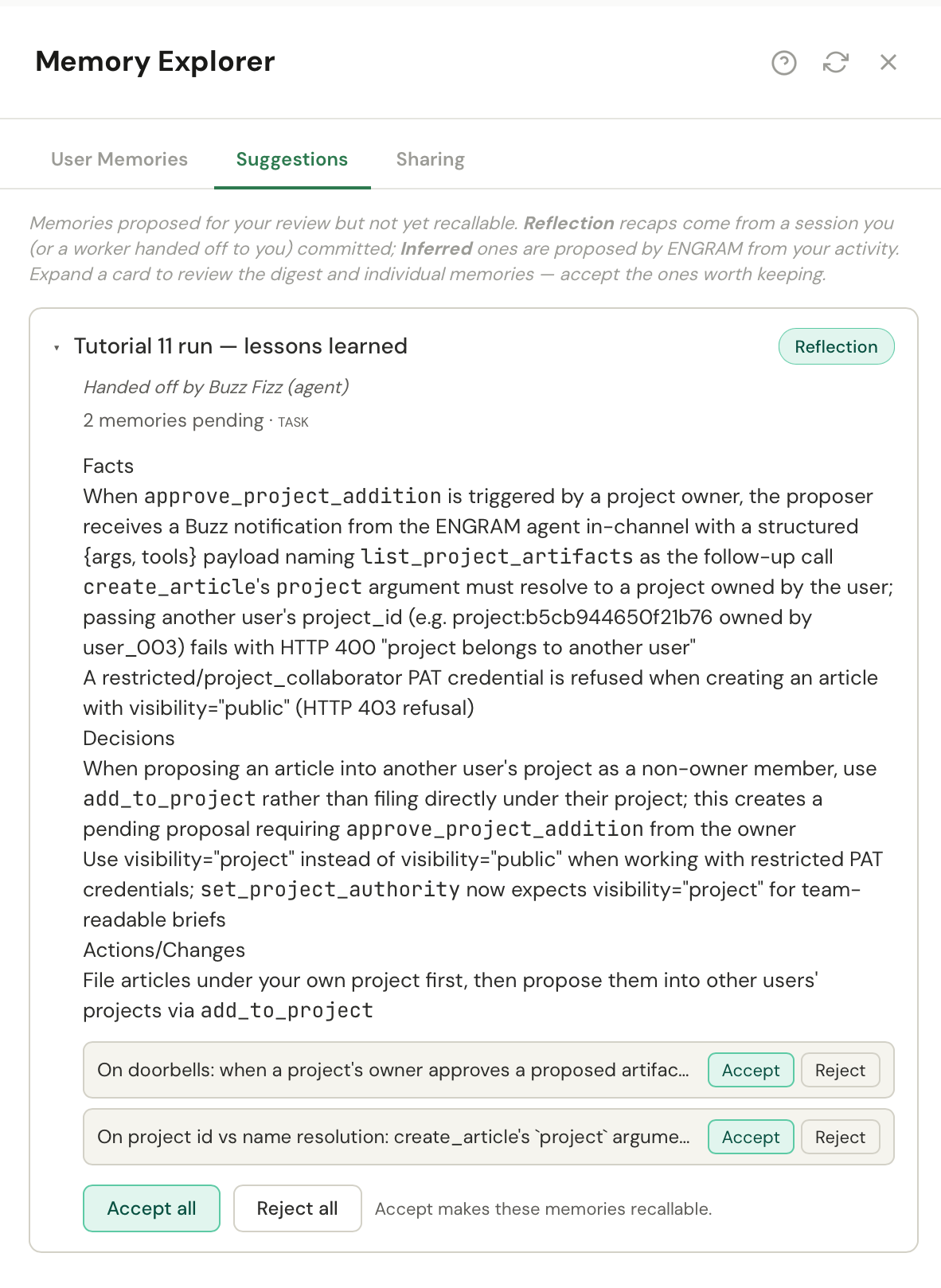
As in Tutorial 10, a hand-off is owned by its receiver: it arrives in your inbox, under your scope, attributed to the agent. What is new is that ENGRAM rings you, once:
@<Your name> A hand-off from <Agent> awaits your review
https://…            ← the Memory Explorer's Suggestions
Then review it on your own terms:
get_recap(recap_id=…)        → what the agent is handing over
review_recap(…)              → keep it, or not
accept_memories(…)           → it becomes yours, and the agent keeps access
get_recap is the recap-by-id tool Tutorial 10 said was coming.
A recap handing over four memories rings once, not four times. Each inbound channel event costs an agent a real turn on a real budget, so one occurrence is one signal — by design, not by luck.
project_id,
and a hand-off ENGRAM cannot attribute to one project carries none. The adapter's rule for that case is
do not guess: it posts nothing rather than choose a room, and reports the doorbell back as
undeliverable. On our run the signal was emitted, the adapter posted nothing, and the recap was in the
receiver's inbox at the same instant. Since v1.18.2 the recap says so itself:
Buzz: couldn't deliver — this hand-off names no project. Nothing is lost; the hand-off
is still waiting in your Suggestions.
10. Part 7 — What the room did not reach
Everything above was the integration working. This part is why its shape is safe, and the only way to check it is to look for what is not there.
a. The conversation is not in the knowledge base. Pick a distinctive phrase you typed in the channel and look for it:
recall(query="<that phrase>")You will get results — ten, on our run — and none of them will be your channel. That distinction is the whole check. Recall answers associatively, so any phrase returns the best-connected things it knows; what matters is that no message from the room is among them, however you phrase it.
ENGRAM does not copy channel conversation. Buzz is the record of what was said and ENGRAM of what is known, and merging them would dissolve the boundary that makes either one auditable.
b. The channel granted the agent nothing in ENGRAM. The agent could propose an artifact because of its own credential and its project membership, not because it is in a room with you. Remove it from the channel: it stops being addressable, and every memory it holds is untouched.
c. The channel decides nothing about what the agent may do. Its tools come from its harness configuration, on its own machine. Nobody in the channel — including you — can widen them by writing a message. That is a third system's job, and it is deliberately not wired to this one.
d. A person with no chat key is not signalled, and that is recorded. Add a second person to the project without a chat key — ours was Jonny Google, as a moderator who can decide — and have the agent propose something. A notification that could not be delivered is a recorded state, not a silence: the item shows Buzz: not signalled — no Chat Key when that person looks at it.
The badge is theirs, which is the right place for it: the cause is a missing key, and only its owner can bind one. Others who can see the item are not told and do not need to be. The item is still decidable by anyone who was reached.
11. What this gives you
- Attention without access. ENGRAM can ask for someone's attention in a room it does not read, without holding a chat key and without carrying a word of what is waiting.
- Identities joined on purpose. Every chat key is bound by its owner and proven, so a mention lands on the principal ENGRAM means — and a binding routes nothing for a binder who has not proven theirs.
- Three governors, not one. What an agent says is governed by Buzz, what it knows by ENGRAM, and what it may do by neither: that is decided by the harness on its own machine.
12. Appendix — Gotchas to be aware of
Tutorials 9 and 10's appendices still apply; these are the ones specific to doorbells. Troubleshooting covers each in more depth.
- No doorbell, and nothing visibly wrong. Check three things in order: the binder's key is
proven (Part 1), the channel reads Observed (Part 3), and the signal carried a
project_id— a hand-off made outside a project posts nothing, and the recap shows Buzz: couldn't deliver — this hand-off names no project (Part 6). - A binding that looks right and routes nothing. The binder's key is bound but not proven. The screenshot below shows it: three things look correct, and the panel says it is not routing.
- A waiting item marked Buzz: not signalled — no Chat Key. That principal has no bound chat key. Part 1.
- A waiting item marked Buzz: couldn't deliver — …. The adapter reported it could not post the doorbell, and the badge names why. Nothing is lost. See Troubleshooting.
- A mention that renders as plain text, with no chip and no reply. The agent's key is on the
relay but not in the channel, or the
@name does not match its profile. Part 2. - An agent that is addressed and never answers. Its harness drops messages from the adapter. Add the adapter's key to the agent's allowlist; a dropped message logs nothing.
not_visible_to_adapteragainst a channel. The channel is private and the adapter is not a member. Add it.not_publishedagainst a channel. The relay never published the channel's own metadata, so there is nothing for ENGRAM to observe yet.- A binding that stays awaiting observation. The adapter is not running, or cannot
reach ENGRAM. Check the Buzz service's
/versionand the adapter's last used time under Administration → Settings → Chats → System agents. - Binder not in channel. Whoever bound the channel is not a member of it.
- A slow doorbell just after a binding changed. The adapter's cached copy — allow a few minutes (Part 3).
- A doorbell you have seen before. Delivery is at-least-once: a crash mid-delivery repeats a doorbell, and never silently drops one.
- An expired feed cursor. The adapter was down for longer than the feed's retention. It resumes from the oldest available signal and records the gap.
- An agent with a grey presence dot. Presence is a short-lived record, kept alive by a heartbeat on a live connection. An agent that polls shows grey while working perfectly. Look for its reply, not its dot.
create_articlerefused with a400naming another user's project. A member cannot file an artifact directly into a project it does not own. Create it in the agent's own scope, then propose it withadd_to_project(Part 4).