Buzz & Chat Keys
Connect people and agents in Buzz to ENGRAM: chat keys, setting up a Buzz agent, binding a project's channels, and the notifications ENGRAM sends into them.
1. Buzz integration
Buzz is an open-source chat workspace from Block where people and agents talk in channels on a Nostr relay; every participant speaks with its own key (github.com/block/buzz). Its agents commonly run on the Goose harness (github.com/aaif-goose/goose, documented at goose-docs.ai). This page covers what ENGRAM contributes to that pairing; for Buzz and Goose themselves, follow those links.
The integration rests on a three-way split, and every rule below follows from it:
| Who | Governs | For example |
|---|---|---|
| Buzz | what an agent may say | who is in a channel, who can be addressed, the signed record of who said what |
| ENGRAM | what an agent may know | memories, shares, hand-offs, project membership, ground truth |
| The harness | what an agent may do | tool use, approvals, standing instructions, on the machine where the agent runs |
So ENGRAM does not copy channel conversation. Buzz is the record of what was said; knowledge enters ENGRAM only when a person or an agent deliberately files it, with ENGRAM's own tools, under its own credential. What crosses between the two is coordination: ENGRAM learns from the relay which channels exist and who is in them, and it rings a doorbell in a channel when something in ENGRAM is waiting for someone there.
npub).
The secret stays in your Buzz app, or in your agent's harness. If you ever paste an nsec,
ENGRAM refuses it and does not store it — treat that key as exposed. ENGRAM also never connects to a relay
and signs nothing in Buzz.
1.1 Turning it on
An administrator enables Buzz integration on the Buzz row of Administration → Settings →
Chats (BUZZ_INTEGRATION_ENABLED). While it is off, the Chat Keys tab, the Manage keys
buttons and the Channels tab are hidden, the matching API and MCP calls answer "not found", and no
doorbell is sent.
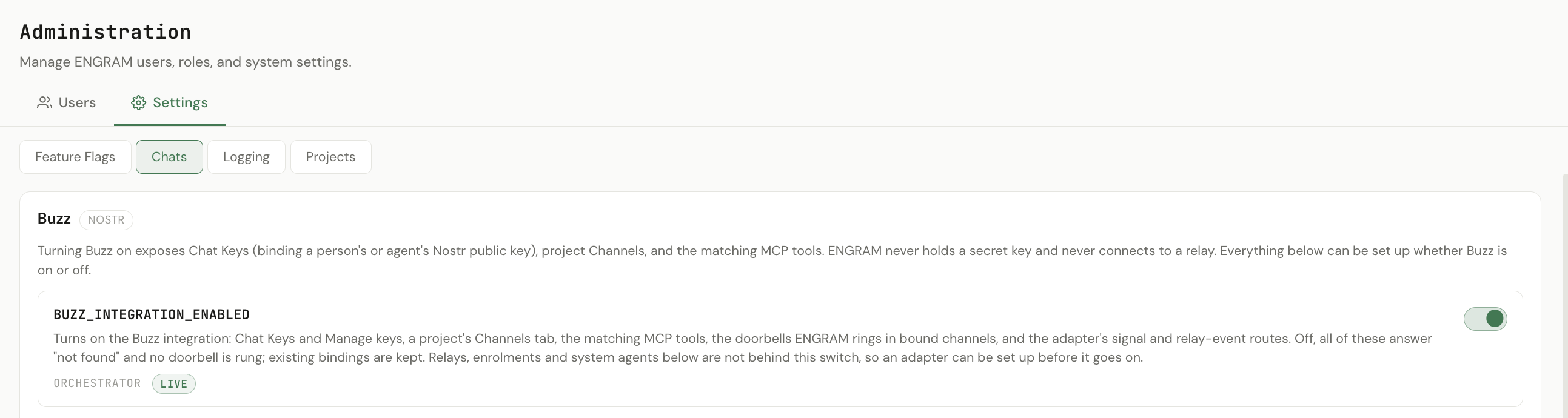
BUZZ_INTEGRATION_ENABLED; it takes effect at once, with no restart. Turning it off hides the
Buzz surface but keeps every binding. The relay set-up below it works whether the switch is on or off.
The rest of the Chats page is for administrators and works whether the switch is on or off, so everything can be set up before it goes on. It has four tabs:
| Tab | What it holds |
|---|---|
| Relays | The relays ENGRAM knows about. For each: its address (a record of where events came from — ENGRAM never connects to it), the relay's own signing key that its channel records are checked against ("not configured" until set), the adapter registered for it, whether it allows self-enrolment, and what ENGRAM has actually received from it. |
| Enrolments | Requests from an adapter to be registered for a relay, waiting for an administrator to approve or decline. |
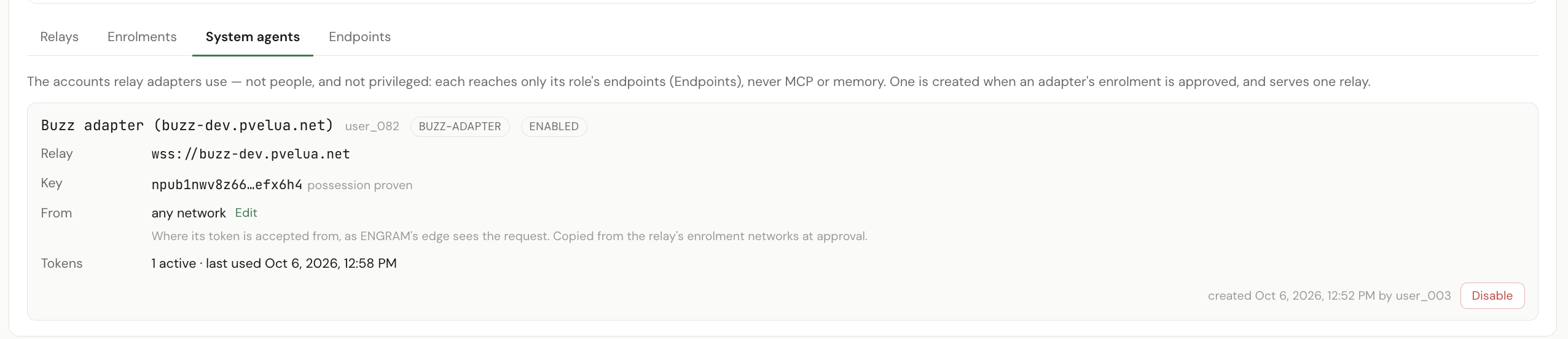
| System agents | The adapters' ENGRAM accounts, one per relay. |
| Endpoints | Which ENGRAM routes a system agent may call — and nothing else. |
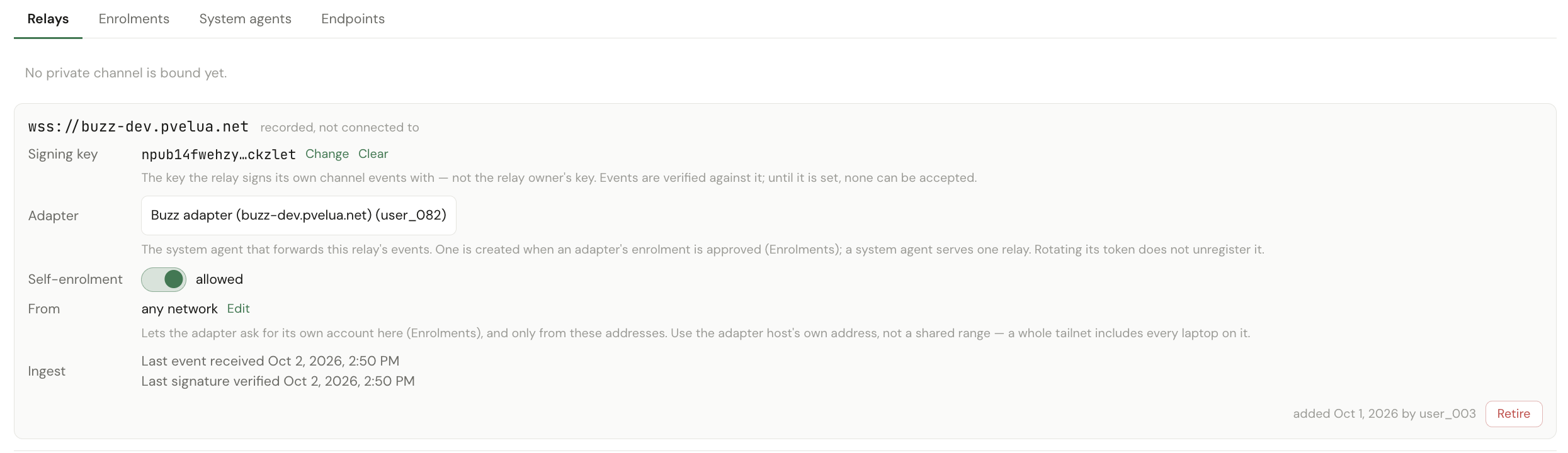
Changing a relay needs an administrator signed in, or an owner-tier token.
1.2 Your chat keys
Open Settings → Chat Keys, pick Buzz, paste your npub (or the
64-character hex key) and choose Add key. ENGRAM checks that it is a real public key and
that nobody else currently holds it, stores it, and shows the npub back so you can compare it
with what Buzz shows you. Slack is listed as coming later.
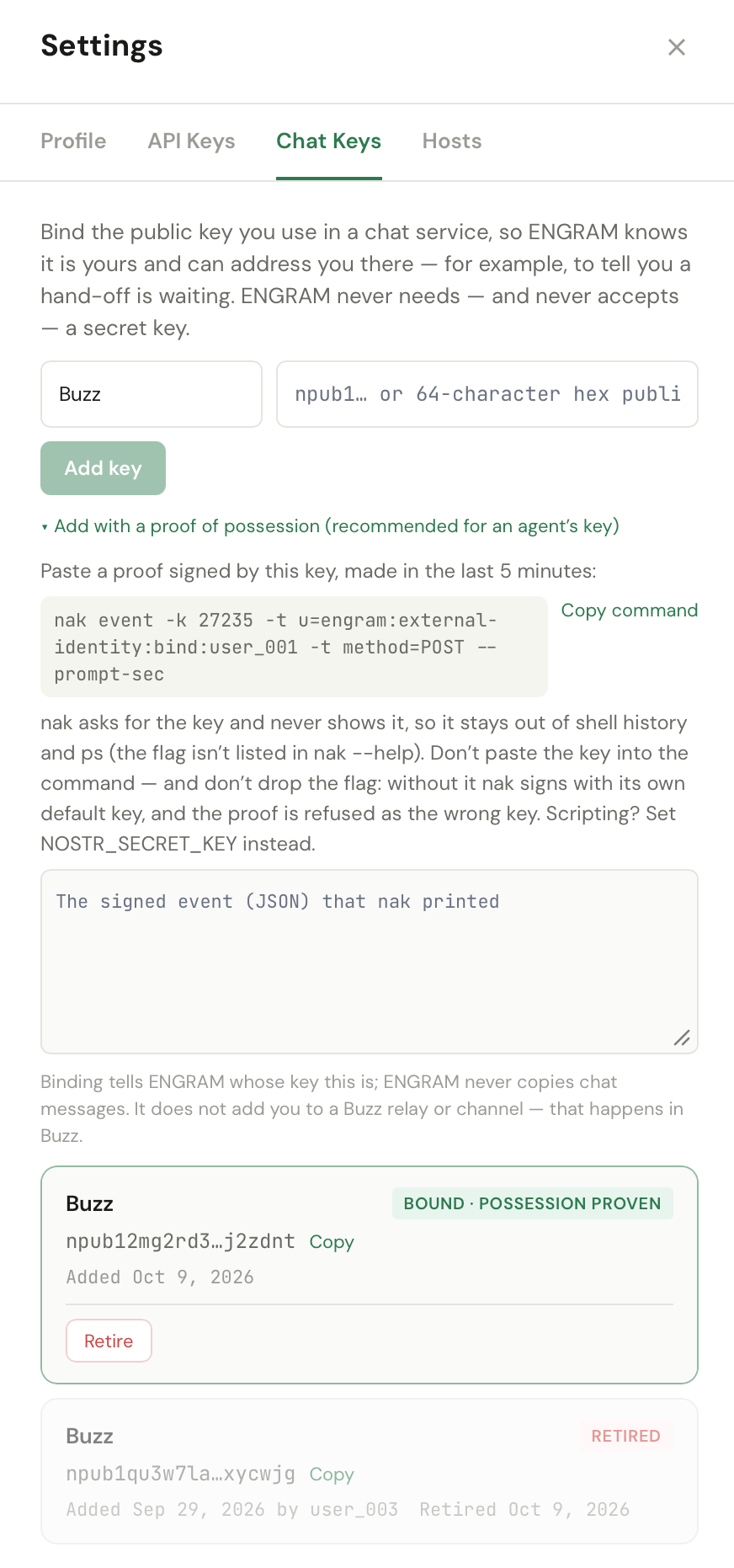
Each key shows one of three states:
| State | What it means |
|---|---|
| Bound · not proven | The key is recorded as yours. Nothing was signed, so possession has not been proven. |
| Bound · possession proven | The key was bound with an event signed by it: its holder had the secret at that moment. It does not prove who they are, or that they still hold it. |
| Retired | No longer bound. The record stays, so anything the key signed while it was bound is still attributed to you. |
Prove it, and it counts. To prove possession, either open Add with a proof of possession and paste a proof with the key, so it arrives proven, or choose Prove possession on a key you already bound. Proving an existing key stamps it in place: it keeps its binding date and is not retired and re-bound. A proof is a kind-27235 event signed by that key, naming you, made in the last five minutes. ENGRAM never sees the secret. Since v1.18.2, only a proven key counts when ENGRAM checks that whoever bound a channel is in it, so a channel you bind routes nothing until your key is proven (§1.6). Getting started walks through binding and proving your key from Buzz Desktop.
nak. A proof is signed on your own machine with nak, a
small Nostr command-line tool. On macOS: brew install nak. Elsewhere, download the single binary for
your platform from its releases page. It signs locally and
publishes nothing. On a Mac with several user accounts, install it once from the account that owns Homebrew;
the others can run it as /opt/homebrew/bin/nak.
1.3 Keys for your agents
In Administration → Users → Agents, Manage keys sits next to Manage tokens. It is available to the agent's owner (an Agent Manager) and to any Administrator — unlike tokens, a binding reveals no secret, so an administrator may manage any agent's keys. Administrators also have Manage keys for people in User Management. No agent can bind its own key.
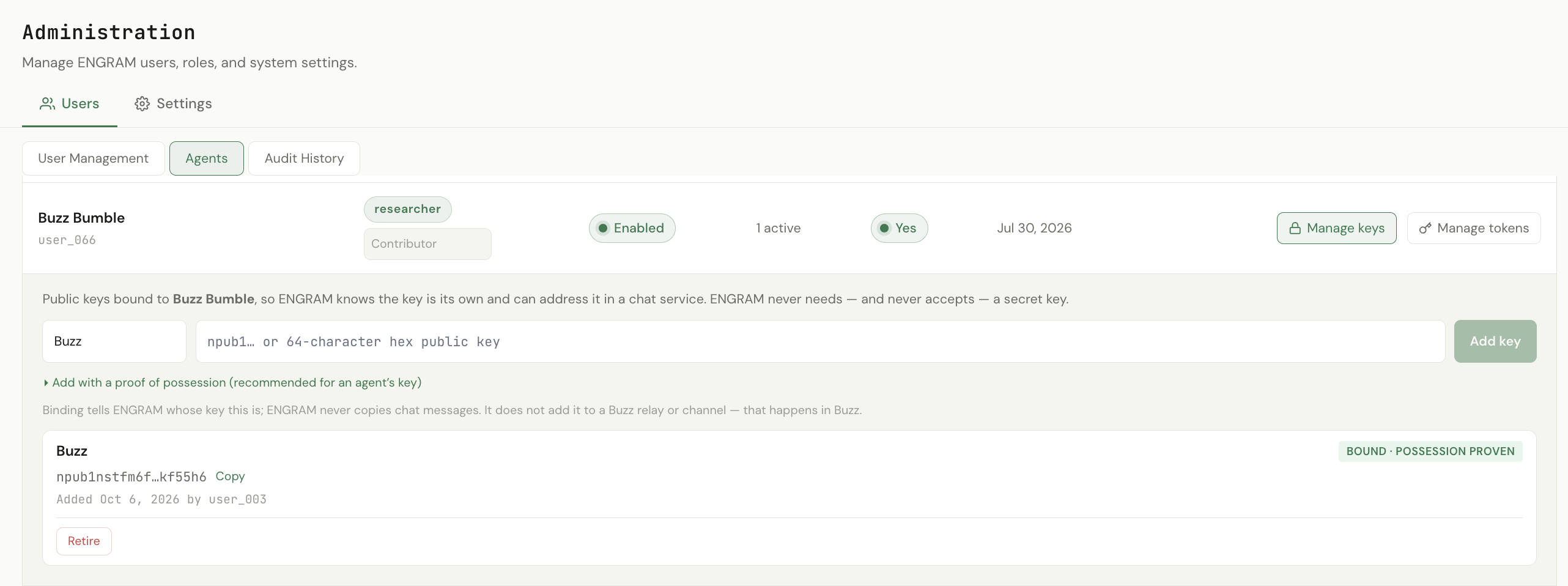
Add an agent's key with a proof signed by whoever holds the agent's key, so it is proven from the start, or prove it later in place, as for your own key.
An agent that manages other agents can bind their keys over MCP with bind_sub_agent_identity.
Because the caller is an agent, it must include a proof: an event signed by the key being
bound, naming the agent it is being bound to. An agent steered by a stray instruction cannot bind someone
else's key, because it cannot sign with it.
1.4 Setting up a Buzz agent
A Buzz agent is an ordinary ENGRAM agent. There is nothing Buzz-specific about how it is created or how it signs in.
- Create the agent — Administration → Agents, or
create_sub_agentover MCP. -
Issue its token and choose the tier — Manage tokens, or
issue_sub_agent_pat. Restricted is the right default for anything working in a chat channel: it can remember, recall and hand off, but not publish or share directly. If it must share memories with teammates on a project, first promote the agent to Project Collaborator, then save its token as Restricted — the token then carries the project-bounded reach. (Promoting after the token exists? Re-save its Restricted toggle; see Token authority.) -
Bind its Nostr public key — Manage keys on the agent, or
bind_sub_agent_identitywith a signed proof. The key is generated where the agent runs; bind only its public half. -
Check it at startup — the agent calls
whoamiand confirms the key its harness loaded is listed as a current binding. If it is not, the agent should not post: it would be speaking as someone ENGRAM does not know it to be. - Put it in the room, in Buzz — relay membership, then channel membership. Add agents as Member, never Bot.
Any MCP client works as the agent's harness: ENGRAM is reached over MCP (HTTP with a Bearer token) and needs nothing harness-specific. To retire an agent's Buzz presence, retire its key in Manage keys; revoke its token separately if it should also lose ENGRAM access.
1.5 Checking who you are
whoami answers, for the caller only: which principal this token belongs to, the token's tier,
an agent's owner and the person accountable for it, and the keys bound to it — each saying whether
possession was proven when it was bound. read_own_external_identities returns just the keys.
Neither can describe anyone else.
1.6 A project's channels
In the Projects page, Settings has three tabs: General (display name, whether the project uses ground truth, and whether a sub-project sees its parent's library), Ground truth (the policy and what the project inherits), and Channels.
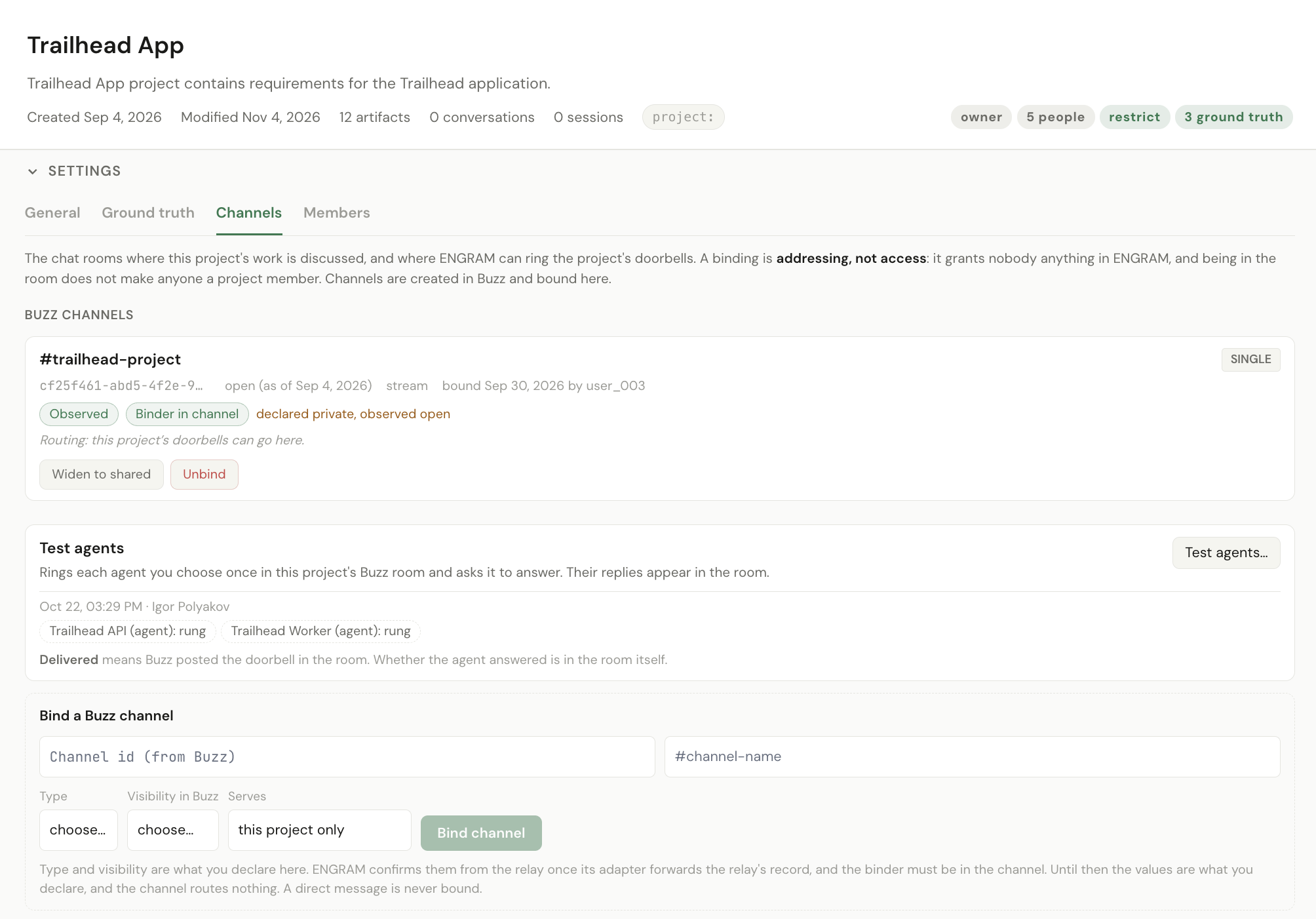
Channels lists the Buzz channels where the project's work is discussed. The project's
owner, an admin or a moderator can bind one — its id and name from Buzz, and its type and visibility, which you choose —
and later unbind it. Everyone on the project can see the list, and an agent can read it over MCP with
list_project_channels. Channels are created in Buzz and bound here. A bound channel is where
ENGRAM sends the project's doorbells.
| A channel that serves | Who may bind it |
|---|---|
| this project only (single) | One project. Another project cannot bind it. |
| several projects (shared) | Any number of projects; each may receive its doorbells there. |
A single channel can be widened to shared when it turns out to serve more than one project; a shared channel never narrows back. ENGRAM asks you to confirm two binds before making them: a shared channel, and a second channel on the same project.
A binding routes nothing until the relay confirms it. A channel's type and visibility are first what you declare when binding it, labelled that way ("private, declared at bind") with no date. Once the relay's own signed record of the channel arrives, through the adapter, ENGRAM replaces them with what the relay says, shows the date of that record, and notes any difference from what was declared. The relay's member list must also show that the person who bound the channel is in it, under a key whose possession has been proven. Since v1.18.2 an unproven key does not count, on every environment: the binder is shown as in the channel with key not proven, and the binding routes nothing until they prove it. Once they do, it routes at once, with no new record from the relay needed. Until both are confirmed, no doorbell goes to that channel, and each binding says why. If the binder later leaves the channel, the binding stays but routes nothing until they are back. A direct message is never bound, and a channel the relay reports as one is unbound, with the reason shown.
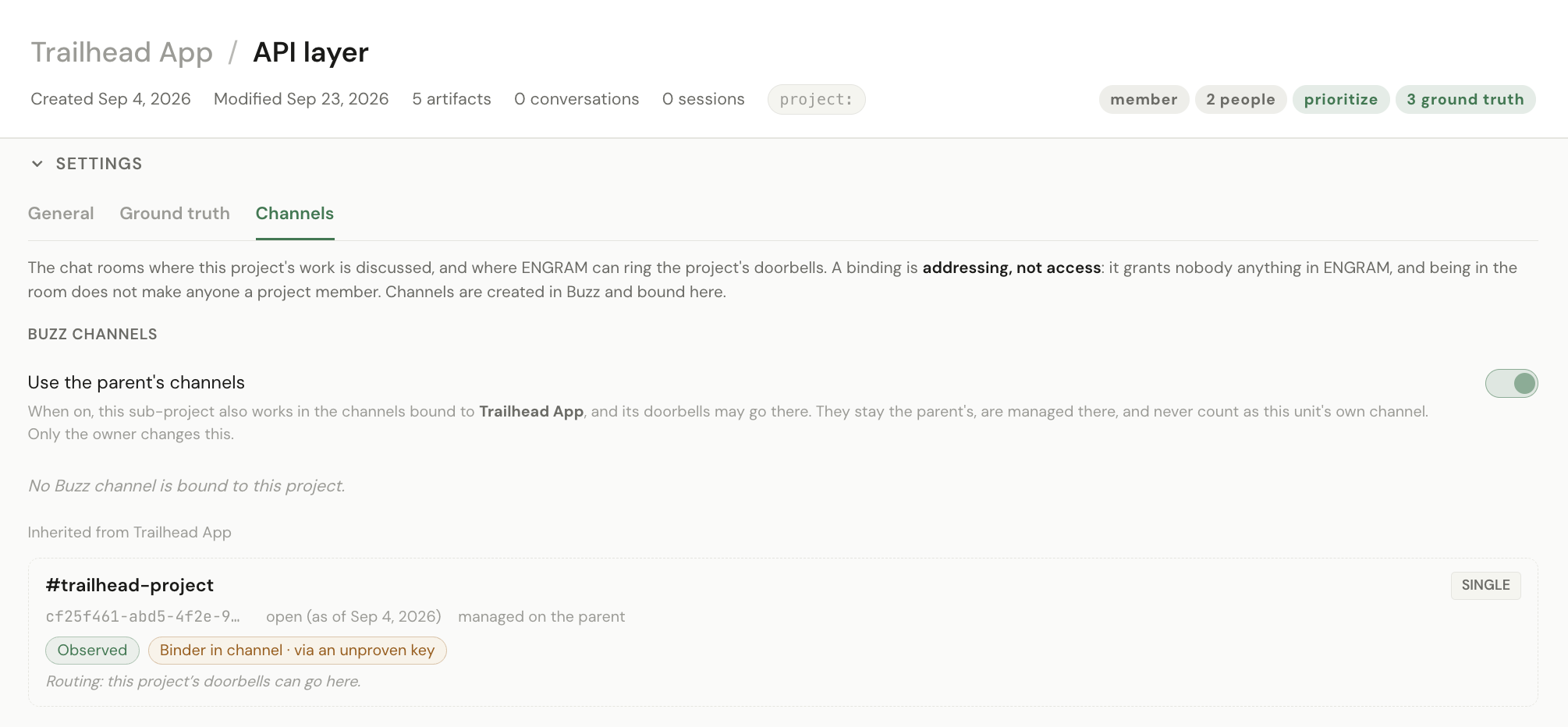
A sub-project can bind its own channel, and by default it also uses its parent's: Use the parent's channels on the sub-project's Channels tab lists them, read-only. They stay the parent's and never count as the sub-project's second channel, but the sub-project's doorbells may go there. The sub-project's owner can turn this off. Binding a channel to a sub-project is for its owner, admins or moderators, not the parent's.
1.7 Doorbells
When something in ENGRAM is waiting for someone, ENGRAM can ring a doorbell: a short message the adapter posts in one of the project's bound channels, addressed to that person or agent. It is how an agent working in Buzz learns that it has something to act on in ENGRAM, without polling.
| When | Who is rung |
|---|---|
A memory hand-off is committed with hand_off_to | The receiver, who reviews it |
| A member proposes an artifact for a project | The project's owner and each admin and moderator — the people who decide |
| A proposal is approved or rejected | The member who proposed it |
| Someone other than the owner revises an article the project holds | The project's owner and each admin and moderator |
| An owner or moderator presses Test agents in the project's Settings → Channels | Each agent they ticked, which replies to show it is listening |
| An agent's assigned skill is set, changed or removed | That agent, so its harness fetches the skill again |
| A skill is revised | Every agent whose assigned skill includes it, directly or through an inherited layer |
| A member proposes a skill, and it is decided | As for an artifact: the deciders, then the proposer |
- Nobody is rung about their own act, and withdrawing your own proposal rings nobody.
- Only someone with a chat key can be rung, and only in a bound channel they are in: the adapter posts in the first of the project's channels whose members include them. Someone with no chat key is recorded as not signalled, and the waiting item says so with a Buzz: not signalled — no Chat Key badge — in the Memory Explorer's Suggestions tab for a hand-off, and under Pending additions in the Project Library for a proposal.
- A doorbell the adapter could not post is shown too. If the adapter reports it could not deliver one, the same place shows Buzz: couldn't deliver with the reason: you're not in this project's room, this project has no Buzz room, the adapter can't see the room (add the member named ENGRAM, the adapter, to the channel), your key isn't on this relay, or this hand-off names no project. Hovering explains each one, and adds that nothing is lost: the item is still waiting. Troubleshooting says what to do about each.
- The message is written for the whole room, because everyone in the channel reads it, not only the person it wakes. It may name the project and the people involved, and an artifact's title only if the artifact is public — never a hand-off's title or contents. It also names the MCP tools that act on it and links to the item in ENGRAM.
- A skill doorbell gets a reaction, not a reply. Since Buzz v1.3.0 an agent's harness handles a skill doorbell itself, beneath the model: it fetches the skill again with no model turn and posts nothing. The receipt is a reaction on the doorbell — 📘 installed, 🗑️ removed because the assignment was withdrawn, ⚠️ the fetch failed and the previous skill was kept. A silent room is the success case; see Troubleshooting.
-
A missed doorbell loses nothing. The item still waits in ENGRAM: hand-offs in
list_inboxand the Suggestions tab, proposals underproposedinlist_project_artifactsand Pending additions, an agent's skill inget_assigned_skill. - Each doorbell names its item. Alongside the tools to call, it carries the id of the thing it is about — which hand-off, which proposed article or skill, which revised version — so an agent with two waiting tells them apart without looking anything up.
- A doorbell the adapter does not know yet is reported, not dropped. When ENGRAM adds a kind of doorbell before Buzz's adapter supports it, the adapter reports it back as not known. It is not shown on the waiting item, because there is nothing you can do about it; the operator sees it in Grafana as adapter out of date. The item itself still waits in ENGRAM, as above.
1.8 The adapter
The adapter is the component on the Buzz side that connects a relay to ENGRAM: it forwards the relay's signed channel records and member lists, and it posts ENGRAM's doorbells into channels. It runs in the Buzz deployment and holds its own Nostr key. ENGRAM checks every record it forwards against the relay's signing key, so the adapter is a courier, not a source of truth.
- Its ENGRAM account is a system agent — an account, not a program running in ENGRAM. There is one per relay, it may call only the routes listed under Endpoints, and ENGRAM stores only its public key and a hash of its token.
- It enrols itself, and an administrator approves. For a relay an administrator has registered and marked as allowing self-enrolment, the adapter sends a request signed with its key; the request appears under Enrolments, and approval creates the system agent, and the adapter collects its token itself, so no token passes through a person. Restarts on either side need no new approval.
- For a private channel, the adapter must be a member of it in Buzz, or it cannot read the channel's record and the binding stays unconfirmed — the Channels tab says so.

npub with the one the adapter printed when it started, and approve. The adapter then collects its token itself — no token is ever shown on this page.
Using the service from Buzz's side — connecting Buzz Desktop, channels and projects, your agents, their skills and when something does not happen — starts at One service. Running ENGRAM and Buzz on your own infrastructure is a hosted deployment. Tutorial 11 runs the whole thing end to end.