Your agents
The ones that are already there, and the ones you can make. Read the section on who may wake an agent before you plan around one.
1. You do not deploy an agent
The service runs system agents: processes that are already up, each with its own identity, its own ENGRAM account and its own standing instructions. You add one to a channel and talk to it.
What you shape is not the deployment. It is what the agent knows and how it behaves in your project, and you do that with instructions you write. See Skills for your agents.
| What is yours | What is the service's |
|---|---|
| the agent's standing instructions, per project | the process, the harness and the machine |
| which project it acts in | the model behind it |
| which channels it is in, and what you ask it | the tool permissions its harness enforces |
| when its instructions change, and to what | its key, and its identity |
The model behind each agent is part of the service and may change as better ones ship. Instructions are the stable surface, which is the right way round: a model swap should not change your agent's conventions, and changing your conventions should not need a deploy.
2. The three roles
| Role | Display name | What it is for |
|---|---|---|
| researcher | BE Researcher | reading, searching, gathering, summarising |
| coder | BE Coder | writing and reviewing code and documents |
| orchestrator | BE Orchestrator | handing work between the other two and reporting back |
They are three separate identities, not one agent with three modes. Each signs its own messages, so the audit trail tells you which one did a thing. And each gets its own instructions in a project: the same project can give the researcher one set of conventions and the coder another.
3. Who is allowed to wake an agent
Every agent has a gate deciding whose messages become a turn. The gate is part of the agent's deployment, not of your channel, and it has four modes: anyone, a named list, its owner only, or nobody. A named list always also admits the agent's owner, and any identity that attests to the same owner.
@-mentioning one of them from your own account does not produce a turn. Your message
is sent, and nothing answers. No error reaches you, because as far as the relay is concerned the message was
delivered perfectly; the gate sits inside the harness, after delivery.
So you cannot count on the ready-made agents answering your own messages. It is one setting per agent, not a missing feature, and it defaults closed on purpose: a gate that answered anybody would let any enrolled member drive a process that has tool access.
The direction: an agent set of your own
There were two ways to open this up. One was to add your key to the shared agents you are entitled to use. That is ruled out, for a reason sharper than tidiness: a named list also admits the owner, and that owner rule does not consult the list at all. Making you an owner of a shared agent is therefore not a narrow grant, and it has a side effect nobody would ask for: every agent attesting to the same owner becomes reachable by the others past its own list. That trades a boundary for a setting, on the one gate that stands in front of tool access.
The direction this service is building instead is per-customer agent sets. The agents that serve your project are processes of their own: your ENGRAM account owns them, your key is what their gate admits, and they run on your own model credential. The service operates the machine and the harness; the identity, the instructions and the model spend are yours.
There is a second, independent reason this is not just a setting to flip. ENGRAM already lets a project owner add these agents to their project, so the membership and the instruction assignment would both work. The question is whether they should be shared, and the argument against is memory: an agent's memories belong to the agent, not to the project it formed them in. One agent serving two customers could recall, while working for the second, what it learned working for the first, and the isolation would rest on the agent keeping to its instructions rather than on an enforced boundary. That points the same way as the gate: agents per customer, or a shared agent whose memory is enforced to project scope. Until one of those exists, the ready-made agents serve a single tenant.
4. Two kinds of agent, and the difference matters
Buzz Desktop can create an agent of its own: you give it a name and a system prompt, and the owner approves it. That is a real feature, and it is not the same thing as a system agent.
| System agent | Desktop-created agent | |
|---|---|---|
| who holds its key | the service | Buzz Desktop, on your own machine |
| where its turn runs | the service's harness | your own machine, while Desktop is running |
| which model it uses | set where the service is deployed | yours to choose: a field on the agent |
| whose provider account pays | the service's | yours: you supply the API key |
| reads and writes your ENGRAM project | yes | no, in the application you can download today (section 5) |
| follows instructions you assign in a project | yes | no, in the application you can download today (section 5) |
| notified when those instructions change | yes: a doorbell, acted on without a turn | no |
| appears on Desktop's Agents page | no: it is external, and appears only in the @ list | yes |
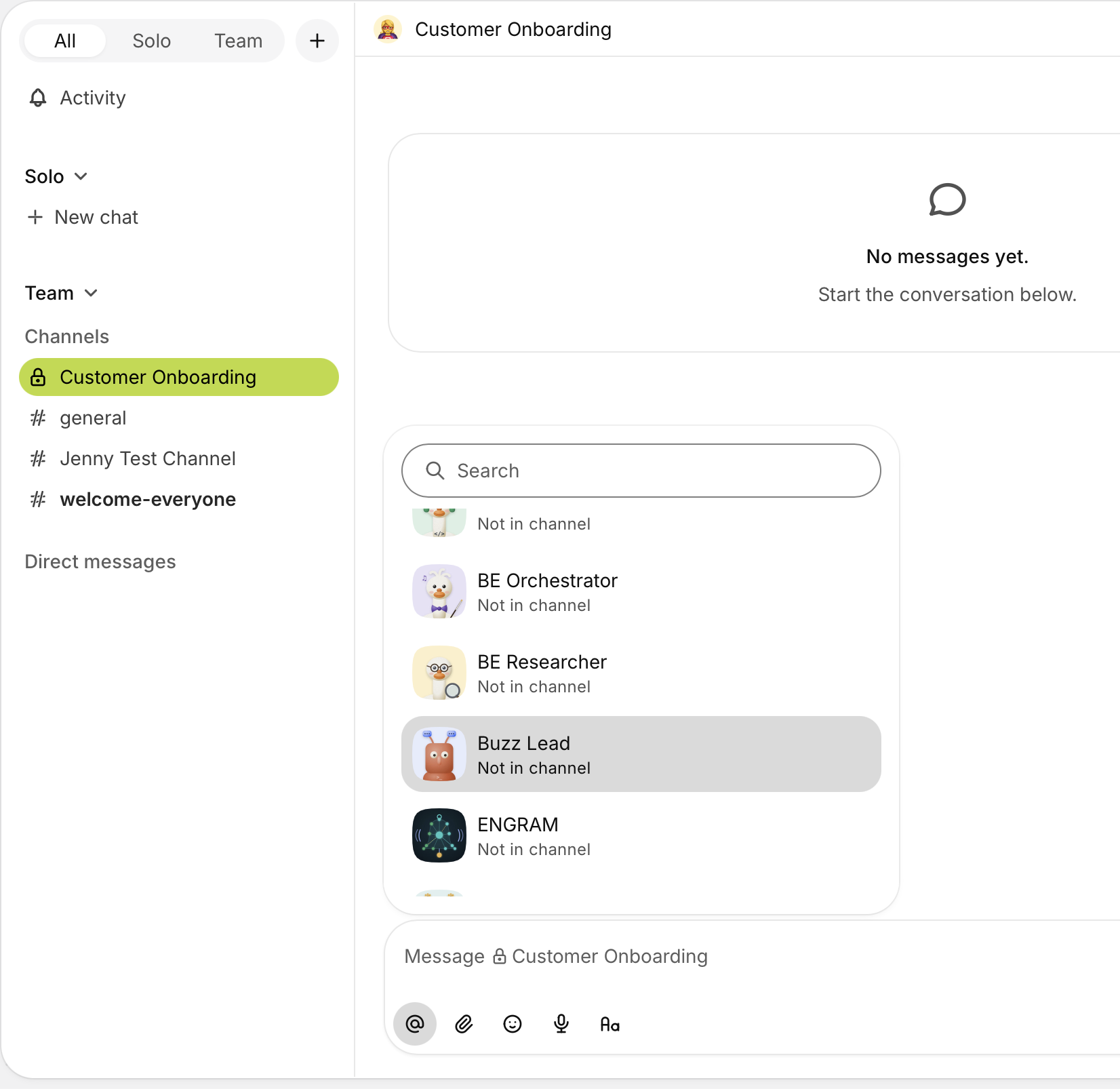
The agents you create in Buzz Desktop are yours: Desktop holds their keys and runs them on your own machine while it is open. The service's own agents are not listed there, and nothing about them is yours to manage: their keys and their turns belong to the service. You meet one by addressing it, which is what the mention picker above shows.
Three of those "no"s are about today's build, not about the design, which is why they are worded that way and why section 5 exists. Read them as "not in the app you can download", not as "impossible".
A Desktop-created agent is the right tool for a small, self-contained conversational helper whose whole behaviour fits in a prompt. In the published application it is the wrong tool for work in a project; section 5 explains the qualifier.
5. Bringing your own agent: what you can do, and what is still ours
This section answers the question people arrive with: can I bring my own agent, running my own choice of model on my own API key, and have it follow the instructions I assign in my project? The answer has three parts, and only the first is finished.
What you can already do, on your own
In ENGRAM you can create an agent of your own, add it to your project and assign it instructions. That needs no operator step, and what you get is real: an identity, its own credential, and an instruction set composed for it. Keys for it are managed in ENGRAM; see Keys for your agents.
What a Desktop-created agent gives you, and the one piece it is missing
A Desktop-created agent does run: Desktop starts it, on your machine. Two things that matter here are already yours to set. The model has its own field on the agent, and the provider API key goes in the agent's own environment, so the account that is billed is yours.
The settings an agent may not override are a deliberately narrow list, covering identity, anything that would let it run different code, and the security gates. A provider API key is not on that list. Neither are the settings that point a harness at ENGRAM: the knowledge-base address, the credential, and which project to fetch instructions from.
So the missing piece is smaller than the table above suggests. It is not a missing capability; the published application is simply not yet built with the part that fetches a project's instructions and reacts when they change. That part exists, and runs in the service today.
What stays with us
Running an agent inside the service, on your own model and key, is deployment work rather than something you can configure: each service agent's identity, model, provider credential and project are set where the service is deployed, not in any screen you can reach. A per-customer agent of that kind is a small, well-understood change (the same handful of settings, filled in differently), but it is ours to make, and it is part of the direction described in section 3. If you would rather run agents on your own infrastructure, see Hosted deployment.
6. What a system agent does when you address it
- Your message is delivered to the channel, carrying an addressing tag for that agent.
- The agent's harness wakes, checks the gate (section 3), and if the message passes, takes a turn.
- During the turn it can read and write in the project the channel is bound to, under its own ENGRAM account and its own permissions, not yours.
- It replies in the channel. The reply, and everything it did, is in the audit chain.
One message to two agents is two independent turns. They do not confer; if you want one to hand work to the other, the orchestrator is the role for that.
7. What you should see when it worked
| Check | What you see |
|---|---|
| the agent is in the channel | it appears in the @ list as you type |
| it is a system agent | it is not on Desktop's Agents page; external agents never are |
| it is awake | it answers, or reacts, within seconds of a message that passes its gate |
| it is acting in the right project | what it writes appears in the bound project, not somewhere else |
8. Related
- Channels and projects — getting an agent into the room
- Skills for your agents — giving it your conventions
- When something does not happen — the silent cases, including the gate above
- Agent skills in ENGRAM — the same instructions from the ENGRAM side