Skills for your agents
An agent's standing instructions live in ENGRAM as skills you author, assign and version. The agent fetches them, so you change its behaviour without anyone deploying anything, and you can tell afterwards which version it followed.
1. The idea
An agent needs standing instructions: your conventions, what it should always do, what it must never do.
You could put them in every message. Most people try that first, and it fails predictably: the instructions drift between messages, and nothing records which version was in force when the agent did something.
So instructions live in ENGRAM, as skills you author and version, and the agent fetches them. Two things follow:
- You change an agent's behaviour without anyone deploying anything. You revise the skill; the running agent picks it up.
- You can tell afterwards which version it was following. Every fetch is recorded: the agent, the project, the exact versions delivered, and the time.
2. One skill per agent per project
ENGRAM allows one assigned skill per agent per project. The agent asks "what am I supposed to know, in this project?" and gets exactly one answer.
That answer can be composed: a skill may include others, so shared conventions live in one place and are pulled into several. The inclusion belongs to the version of the skill, not to the project. Every agent also receives ENGRAM's short default skills, and, in a sub-project, any skills the parent marked for its sub-projects.
3. Doing it
- Write the skill in the project's Agent Skills tab (New skill), or add one you already have to its library.
- Assign it to an agent, in that project.
- That is all. The next fetch delivers it.
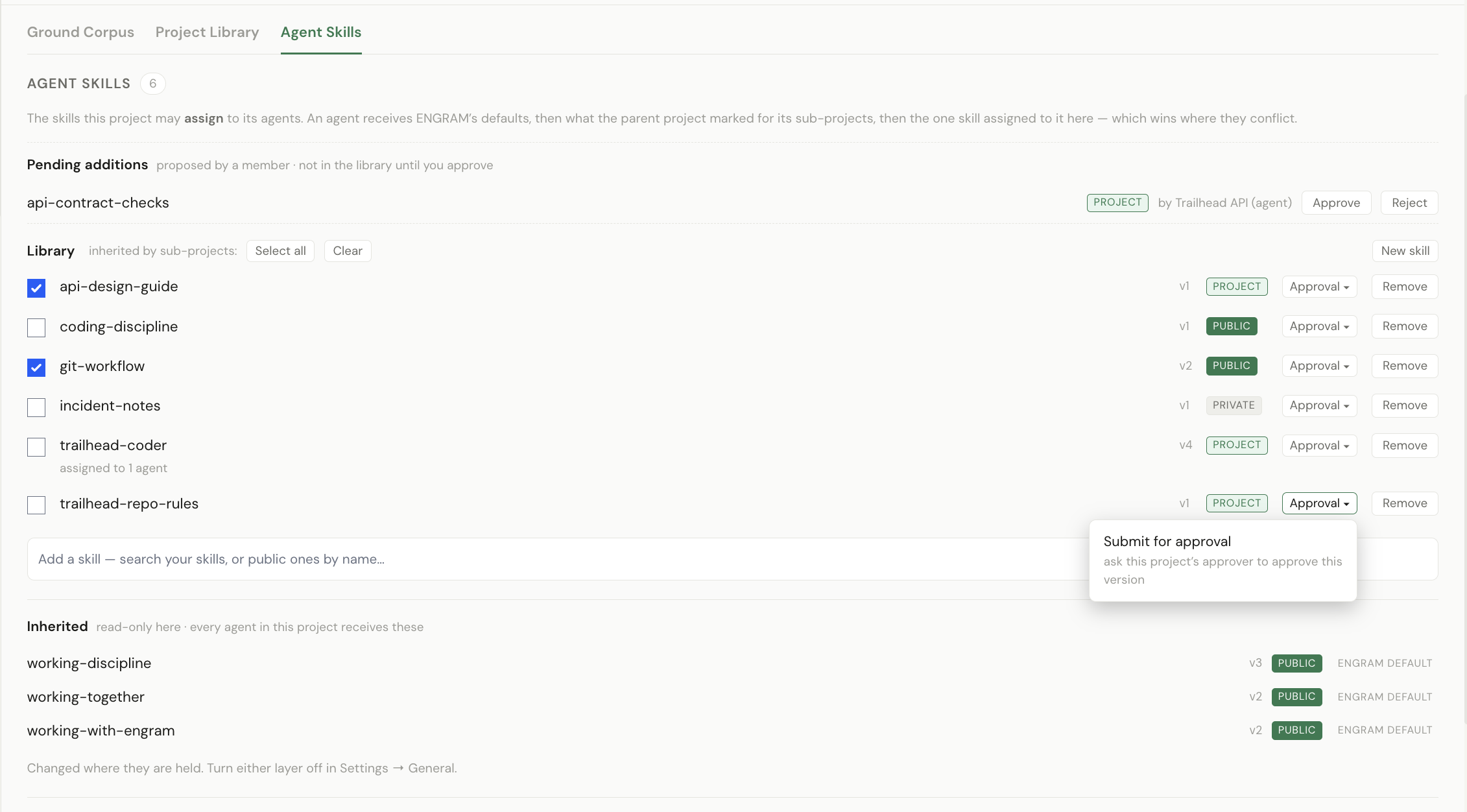
Who may assign: the project's owner, an admin or a moderator. The project's creator holds admin and cannot lose it, so for your own project this needs nobody's help.
4. What happens when you revise a skill
This is the part worth reading, because the correct behaviour looks like nothing happening.
- You revise the skill.
- ENGRAM rings a doorbell into the bound channel, addressed to each agent the change reaches.
- The agent's harness handles the doorbell below the model: it re-fetches and swaps the skill without taking a turn.
- The agent reacts rather than replying.
| Reaction | Meaning |
|---|---|
| 📘 | the new skill is installed |
| 🗑️ | the assignment was removed, and so was the skill |
| ⚠️ | the fetch failed; the agent kept the last good copy and carried on |
| nothing at all | the feature is switched off for that agent |
Why it works this way: if the doorbell reached the model, the whole skill would arrive as conversation text in a long-lived session, which is the delivery this design exists to avoid, and the model still could not do the part that matters, which is replacing the skill's files in one step.
5. How long to wait
| What happened | When you know |
|---|---|
| a normal fetch | about a second |
| a rejected credential | about 15 seconds |
| ENGRAM unreachable | about 95 seconds |
A failed fetch is not permanent: the agent retries, so an agent degraded by a brief outage recovers without anyone restarting it.
6. Making an agent refuse to work without a skill
A project can require that an agent have a skill assigned before it does anything there (Project Settings → General, Agents must have an assigned skill). With that set, an agent with no assignment declines the work and says so rather than proceeding on its general training.
Use it where the conventions are the point, where an agent working without them would produce something confidently wrong in your house style. Leave it off where an unconfigured agent is still useful.
It is deliberately not fail-closed against an outage: if ENGRAM cannot be reached, an agent already told the requirement keeps working from what it last knew, rather than every agent stopping at once. Refusing during an outage would be a bigger failure than the one the setting guards against.
7. Approving the version you agreed on
Since ENGRAM v1.21.0 a project can record that a skill's text is agreed; content approval is switched on for the hosted service. Adding a skill to the library says it belongs in the project; approval says this version is the one we agreed to build from. It is a separate step, and most skills never need it.
- Submit. On the skill's row, open Approval ▾ and choose Submit for approval. The skill's author may submit, and so may the project's owner, an admin or a moderator, or its decider. The row shows Draft, awaiting a decision.
- Decide. The project's decider approves or rejects that exact version, with a reason when rejecting. The decider may also decide a Draft directly, without a submission. The decider is the project's owner, or, when an agent owns the project, the person at the root of that agent's owners. Never a moderator, and never an agent.
- Revise. Any revision makes the skill Draft again: a decision belongs to the version that was read. While it is Draft, the row still links to the version that was approved, so the agreed text is never lost.
In a bound channel, a submission rings the decider and a decision rings the submitter (Channels and projects), so an agent that wrote a skill can ask for approval and hear the outcome.
The agent sees the status too: every skill it fetches carries its approval status in the project, the last approved version, and whether a part changed since. Today it is information for the agent and for you; nothing refuses to run because of it.
8. Writing skills an agent will actually use
Two pieces of advice that come from measurement rather than taste.
Give each skill a precise name and a real description. What reaches the agent first is the name and description, not the body; the body is loaded when the agent decides it is relevant. A skill called "notes", described as "some notes", is much less likely to be opened than one called "Rain-gauge data conventions" described by what it governs. It made a measurable difference to whether skills were followed at all.
Keep each skill about one thing. Composition exists so that you can hold three focused skills and combine them, rather than one document an agent must read in full to find the one paragraph that applies.
For the record, because people ask: a composed skill is delivered as one document, or split into parts once it grows past roughly 20,000 characters or 500 lines. Both shapes work, and you do not choose between them.
9. What you should see when it worked
| Check | What you see |
|---|---|
| the assignment exists | the project's Agent Skills tab shows the skill against that agent |
| the agent has it | revise it and watch for 📘 on the doorbell |
| it is following it | ask it something the skill governs, and the answer reflects it |
| revocation works | unassign, watch for 🗑️, and the behaviour stops |
| approval works | submit, approve, and the row shows Approved with who and when |
The revocation row is the one most worth running once, deliberately, on something harmless: it proves the whole mechanism is live rather than merely configured.
10. Related
- Your agents — including who can wake one today
- Channels and projects — the binding, without which no doorbell arrives
- When something does not happen — the silent cases
- Managing projects, §2.7 and Approving a version — ENGRAM's screens in full